Overview
To use Herdy's TVD features — import, notifications, ear tag management, and alpine summering — you need to connect Herdy to your agate.ch account once. You then link your farm to the appropriate TVD number.
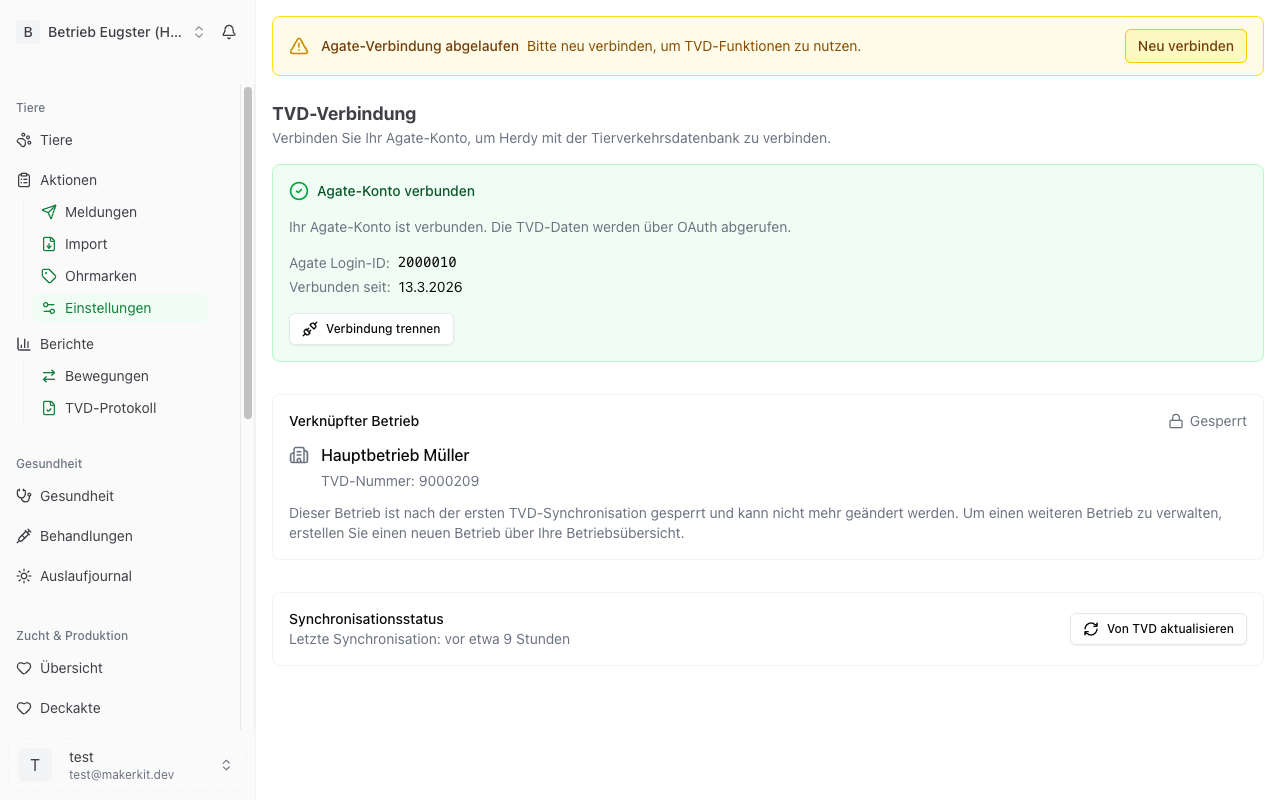
You can find the TVD settings under TVD > Settings in the main menu. The page shows three sections: Agate connection, linked farm, and synchronisation status.
Connecting your Agate account
The connection to agate.ch is made via OAuth — you are redirected directly to the agate.ch login page and do not need to enter your password in Herdy.
Step-by-step guide
- Navigate to TVD > Settings.
- Click Connect with Agate.
- You are redirected to agate.ch. Log in there with your credentials.
- After successful login you are redirected back to Herdy.
- Herdy displays a confirmation: your Agate account is connected.
After the connection you can see your Agate Ext-ID, Login ID, and the connection date.
Renewing the connection
The Agate session has a limited validity period. Herdy shows you a warning in good time when the session is about to expire. Click Renew now to log in to agate.ch again.
If the session has already expired, a notice appears. Click Reconnect to restore the connection.
Disconnecting
If you want to disconnect the Agate connection:
- Navigate to TVD > Settings.
- Click Disconnect.
- Confirm the action.
After disconnecting, the TVD features (import, notifications, ear tags, alpine summering) are no longer available until you reconnect.
Linking your farm
After the Agate connection you need to specify which TVD farm is linked to your Herdy account.
Initial linking
When you connect to Agate for the first time, Herdy automatically redirects you to the farm selection:
- Herdy loads the farms associated with your Agate account.
- Select the desired farm (TVD number, name, and location are displayed).
- Click Link Farm.
- Herdy shows a confirmation dialog: "Is this your farm?" — with a note that the farm cannot be changed after the first synchronisation.
- Confirm with Yes, Link Farm.
Changing farm (before the first synchronisation)
As long as you have not yet synchronised any animals, you can change the linked farm:
- Navigate to TVD > Settings.
- Under the linked farm, click Change Farm.
- Confirm the warning.
- Select the new farm from the list.
- Click Apply Farm.
Farm is locked (after the first synchronisation)
Once you have synchronised or imported animals from the TVD for the first time, the farm is permanently locked. The padlock icon and the "Locked" label indicate this.
This lock ensures that your synchronised animal data always remains assigned to the correct farm. You can no longer change the farm afterwards.
Tip: If you manage multiple farms, create a separate Herdy account (team) for each farm via your farm overview. Each farm gets its own TVD link that way.
Synchronisation status
Under TVD > Settings you can see the current synchronisation status:
- Last synchronisation — Date and time of the last successful synchronisation.
- Never synchronised — If no synchronisation has been performed yet.
Click Update from TVD to start a manual synchronisation. This reconciles your animals and ear tags with the TVD.
Sync history
Herdy logs all synchronisations. You can view the history to trace when which changes were made. For each synchronisation you can see:
- Trigger — Manual, automatic, or on initial connection.
- Status — Completed, partially completed, or failed.
- Summary — How many animals were added, updated, or synchronised.
Click Show Details to see the individual changes from a synchronisation (e.g. which animals were newly imported or updated).
What is the Agate connection needed for?
Your Agate connection enables the following features:
| Feature | Description |
|---|---|
| Import herd | Loads your current animal inventory from the TVD |
| Send TVD notifications | Transmits birth, arrival, departure, death, and slaughter notifications |
| Synchronise ear tags | Reconciles your ear tag inventory with the TVD |
| Alpine summering | Creates batch notifications for alpine ascent and descent |
Without an Agate connection you can still use Herdy for animal management, but the direct TVD connection is not available.
Security
- The connection is made via OAuth — Herdy does not store your agate.ch password.
- The access tokens are stored encrypted (via Supabase Vault).
- Herdy uses the tokens exclusively for communication with the TVD interface.
- You can disconnect at any time.
Common problems
"Agate connection expired"
The Agate session has a limited validity period. Click Reconnect and log in to agate.ch again.
"No farms found"
- Make sure at least one farm is associated with your agate.ch account.
- If you have questions, contact your cantonal veterinary service or identitas.ch.
Farm cannot be changed
Once animals have been synchronised, the farm is locked. If you have genuinely linked the wrong farm, contact Herdy support.
Tip: Keep your agate.ch credentials safe — not only for Herdy, but also in case you need to log in directly to agate.ch.