The pedigree gives you a clear overview of the family relationships in your herd: for breeding planning, for avoiding inbreeding, and for proving ancestry to a breeding organisation.
Opening the pedigree
- Navigate to Breeding and select the Pedigree tab.
- Choose the animal whose pedigree you want to view.
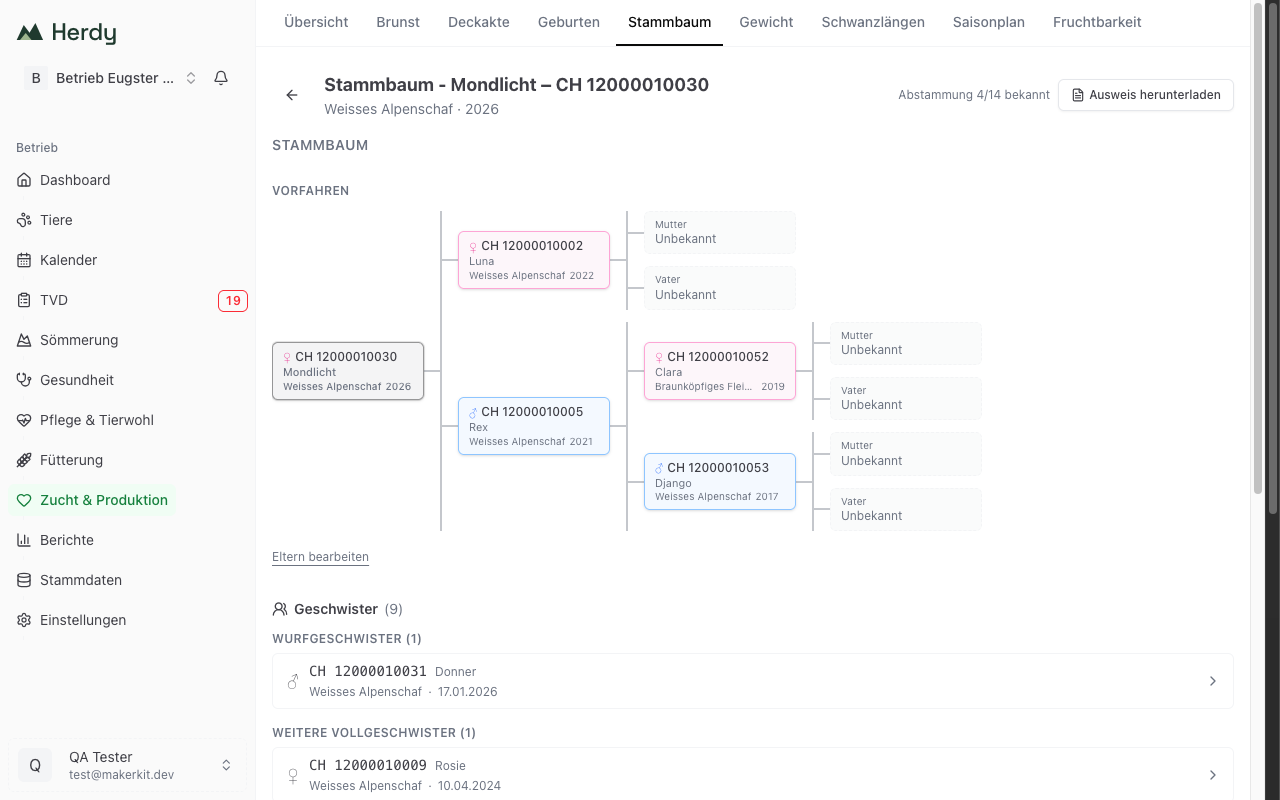
- The pedigree is displayed immediately as a tree diagram.
What the pedigree shows
The pedigree presents the family relationships of your animal as a clear tree diagram across multiple generations:
Parents (1st generation)
- Dam — The ewe or doe
- Sire — The ram or buck
Grandparents (2nd generation)
- GM (maternal grandmother) and GF (maternal grandfather)
- GM (paternal grandmother) and GF (paternal grandfather)
Great-grandparents (3rd generation)
If the data is available, Herdy also shows the great-grandparents. This allows you to trace ancestry back three or more generations.
Unknown ancestors
If a parent is not registered in Herdy or the ancestry is not known, the placeholder Unknown is displayed. This is perfectly normal, especially for purchased animals or older stock.
Tip: The more ancestry data you maintain, the more informative the pedigree becomes. Record parent animals as early as possible when adding a new animal.
Navigating the pedigree
You can tap any animal in the pedigree to switch directly to its own pedigree. This lets you click through the generations and explore the entire family history.
Example: You are viewing the pedigree of lamb "Bella". You tap the dam "Luna" and now see Luna's pedigree with her parents and grandparents.
Below the diagram, Edit parents leads straight to where you add or correct the animal's dam and sire.
Viewing offspring
Below the pedigree you will find the list of all offspring of the selected animal. For each offspring the following is shown:
- Ear tag — The official identification number
- Name — The call name of the animal
- Sex — Male or female
- Date of birth — When the animal was born
- Other parent — The other parent (for a ewe, the sire; for a ram, the dam)
This gives you an immediate overview of how many offspring a breeding animal already has and who they are.
Mini pedigree in the animal profile
You do not always need to open the full pedigree view. In the animal profile of every animal there is a compact mini pedigree in the Breeding tab. This shows the direct parents and is ideal for a quick check of ancestry.
Siblings
Below the pedigree, Herdy lists the animal's siblings, grouped by how closely they are related:
- Littermates: from the same litter
- Other full siblings: same dam and same sire, but a different litter
- Same dam: maternal half siblings
- Same sire: paternal half siblings
Long groups are shortened; Show all expands them. Each sibling is a card you can tap to open its animal profile.
If no parent is recorded for an animal, a note appears here instead of a list, saying that siblings cannot be determined without parents.
Ancestry completeness
In the header of the pedigree page you will see how complete the known ancestry is, for example "Ancestry 6/14 known". This tells you at a glance how many of the possible ancestor positions (up to three generations) are filled — a quick prompt for where it is still worth recording parents.
Inbreeding check when planning a mating
When you record a mating and select both a dam and a sire, Herdy calculates an inbreeding check for the potential offspring before you save:
- The predicted coefficient of inbreeding (COI) is shown as a percentage and colour-graded from green (unrelated) to red (close relatives, e.g. half-sibs at 12.5 % or parent–offspring / full-sibs at 25 %).
- The common ancestors behind the value are listed, so you can see exactly why a pairing is close.
The check is advisory — you can still record the mating — but it helps you avoid unintended close matings at the moment the decision is made.
Progeny performance
For a breeding animal, the Breeding tab summarises how its offspring have performed: the number of progeny and birth events, the average litter size, the live-birth rate, the average birth weight of the offspring, the birth-ease breakdown, and — for dams — the average mothering score. This helps you identify your most productive lines.
Downloading a pedigree certificate
At the top of the pedigree page, Download certificate generates a printable pedigree certificate as a PDF. It contains the animal's identity (ear tag, name, breed, sex, date of birth), its inbreeding coefficient, and its ancestors grouped by generation — ready to hand to a breeding organisation or a buyer.
How you can use the pedigree
Avoiding inbreeding
Before assigning a ram or buck to a group, check the pedigree for shared ancestors. This helps you avoid close relative pairings.
Breeding selection
Identify successful lines by looking at the offspring of your best breeding animals. Which ram produces the strongest lambs? Which dam lines have the best rearing behaviour?
Proof of ancestry
For breeding organisations or when selling breeding animals, you can provide complete documentation of your animals' ancestry.
Origin verification
For purchased animals you can compare the stated ancestry with the data in Herdy, provided the ancestors have been registered.
Tip: Use the pedigree regularly before the mating season. This allows you to plan ram and buck assignments optimally and avoid unintended inbreeding.