Weight monitoring is an important tool for breeding assessment and health surveillance. Herdy shows you which animals are due for a weighing, displays weight development as a chart, calculates daily gain, and warns you when an animal is underweight. This lets you spot early on whether your animals are developing optimally.
The weighing list
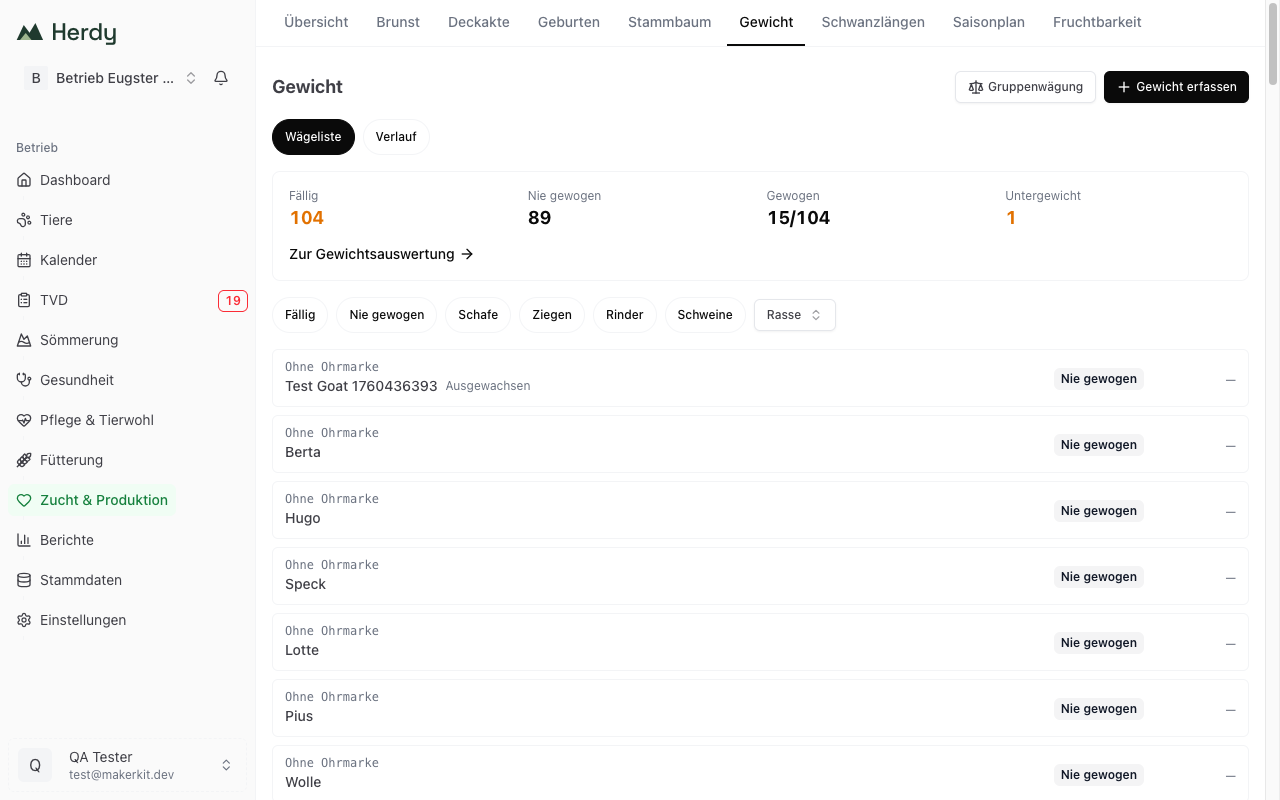
Breeding → Weights opens with the weighing list: one entry per animal, sorted by urgency, never-weighed animals first, then those overdue the longest. Every row shows the last weighing ("34 d ago" or "Never weighed"), the daily gain, and an Underweight badge where applicable.
The summary card at the top counts Due, Never weighed, Weighed and Underweight for the whole herd and leads to the report via Go to weight analysis, see Weight Analysis. The figures always describe the whole herd, even when you filter the list below.
The filter chips underneath narrow things down: Due, Never weighed, the species present and Breed. As soon as a species is chosen, the Age class filter is added.
Recording happens straight from the row: tap it, enter the weight, Save & next. That lets you work through a whole pen without ever opening a form, with the animal's last weighing shown for comparison. The History toggle takes you to the chronological list of all weighings.
Recording a single weight
- Navigate to Breeding and select the Weights tab.
- Tap Record weight.
- Select the animal from your herd.
- Enter the weight in kilograms (e.g. 45.5).
- Select the date of the weighing.
- Optional: Add notes (e.g. "before shearing" or "after alpine summering").
- Tap Save.
Tip: Record the birth weight directly in the birth form. A dedicated field is provided there. This weight is automatically displayed as the first entry in the weight curve.
Batch weighing
When you weigh several animals at the same time (e.g. at a post-summer weigh-in), batch weighing is significantly faster than recording weights individually.
How to carry out a batch weighing
- Navigate to Breeding and select the Weights tab.
- Tap Batch weighing.
- Choose the Weighing date. It applies to every weight in the group.
- Add the animals: with Add entry by hand, or by scanning the ear tags with a reader. A scanned animal appears immediately as a row waiting for its weight; an animal already on the list is reported as "Already selected".
- Enter the weight for each animal.
- Tap Record X weights at the bottom.
All weights are saved at once. If an animal has no weight, Herdy says so rather than dropping the row silently.
Tip: for a batch weighing in the barn it is practical to have one person put the animals on the scale while a second person enters the weights on the phone. How to connect a reader is described in Bluetooth reader.
For other series work such as treatments, the recording sessions under Actions follow the same pattern: set the shared details once, then scan animal after animal. See Recording Sessions.
Weight chart
The weight chart shows an animal's development as a line graph:
- X-axis: Age in days
- Y-axis: Weight in kilograms
- Blue line: The actual weight data for your animal
- Dashed line: The breed average as a reference value
Comparing with the breed average lets you immediately see whether your animal is growing above or below average.
Requirement for age calculation
For Herdy to calculate the age correctly and display it on the X-axis, the animal's date of birth must be entered. Without a date of birth, no age curve can be created.
Tip: If you do not know the exact date of birth (e.g. for a purchased animal), estimate it as best you can. Even an estimated date produces a useful growth curve.
Growth metrics
Herdy automatically calculates important metrics from your weight data:
Daily gain (g/day)
The daily gain shows how many grams an animal gains per day. It is calculated from the difference between two weighings. This metric is particularly meaningful for fattening lambs and rearing animals.
Example: A lamb weighs exactly 12 kg on day 30 and exactly 30 kg on day 90. Daily gain = (30 - 12) / (90 - 30) = 300 g/day.
Underweight warning
If an animal's weight falls below the breed-specific threshold, Herdy marks the animal with an Underweight badge. This badge is also visible in the animal list so you can quickly identify affected animals.
Possible causes of underweight:
- Insufficient feed supply
- Parasite infestation
- Illness
- Litter size too large (in multiple births)
Tip: An underweight badge is not an alarm, it is a signal. Check the animal, look for possible causes, and act if necessary. Often supplementary feeding or deworming is enough.
Viewing weight data
You can view the weight data for your animals in two places:
From the animal profile
Open the animal in animal management and switch to the Weight tab. There you will see the chart and the complete list of all weighings for that animal.
From the weighing list
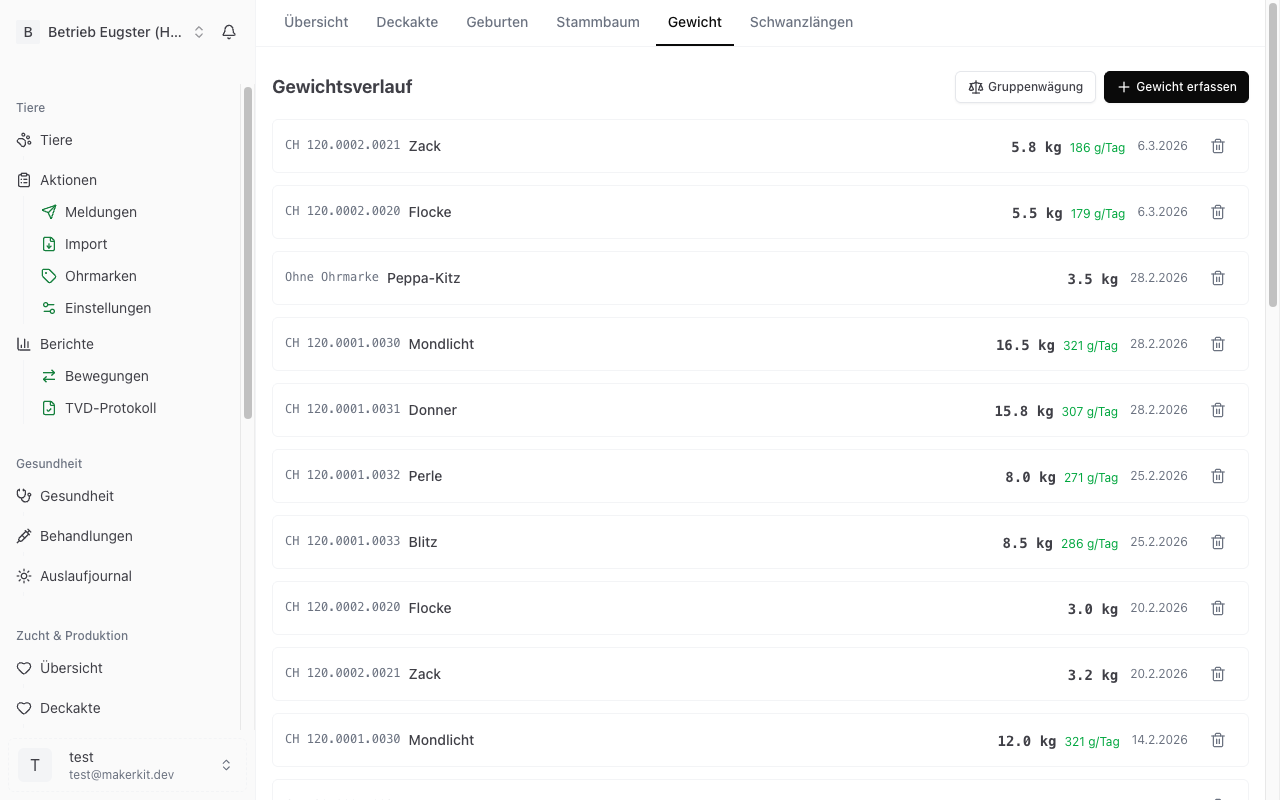
Under Breeding → Weights you see the last weighing for each animal; the History toggle shows the full list of all recorded weights, sorted by date. The bin icon there deletes a single weighing.
Weight analysis by age class
Under Reports → Weight, the weight analysis compares your herd as cohorts: the chart shows the average daily gain (ADG since birth) as the median per breed, compared within the same age class. The table below lists, per cohort, animals, median weight, median daily gain, spread, and underweight cases.
Deliberate limits apply here so that the numbers stay honest:
- Average daily gain only for young animals — for full-grown animals, daily gain measures age, not performance; adult cohorts therefore show their weight
- The cohort is based on the age at the time of weighing, not today's age
- Groups that are too small show "not enough data" instead of false precision; the chart only appears once there are at least two comparable groups
- Breeds without a stored reference curve show "no breed curve" instead of false underweight warnings
Practical notes
- Weigh regularly: Weigh your animals at regular intervals (e.g. every 4 weeks) so that the weight curve is meaningful.
- Consistent conditions: Weigh at the same time of day and under the same conditions where possible (e.g. in the morning before feeding).
- Lambs and kids: Regular weighing is especially valuable for young animals. A weight plateau or weight loss is an early warning sign of problems.
- Breeding decisions: Daily gain is an important selection criterion. Animals with high daily gain are often genetically valuable for breeding.