Heat observation is mental arithmetic: 21-day cycles, check windows after mating, breeding maturity of young animals -- nobody keeps all of that in their head across a whole herd. Heat monitoring does the calculating for you: a work list that tells you which animal needs a check and when, with the reason stated for every animal.
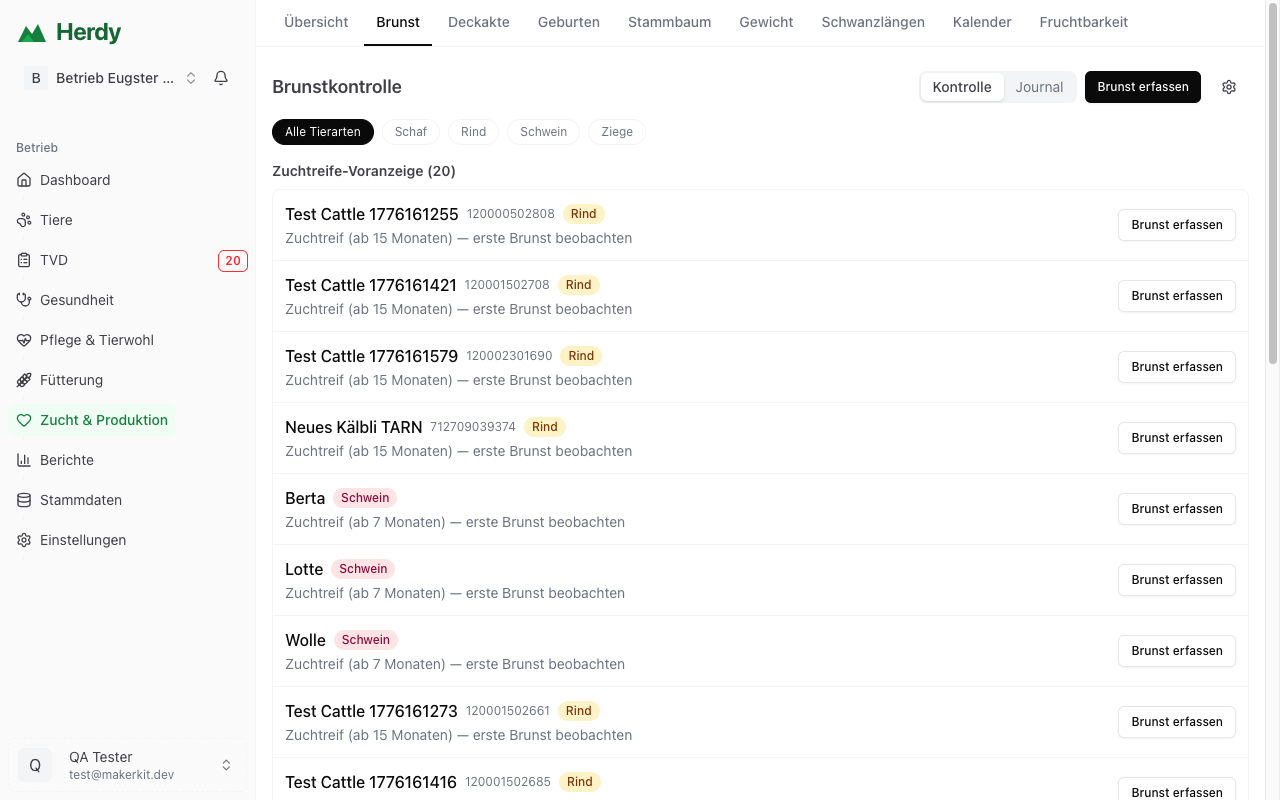
Opening the page
Breeding → Heat. At the top right you switch between Checks (the work list) and Journal (all recorded heats). Use Record heat to enter an observed heat directly; the gear icon leads to the settings.
What appears on the list
The work list is grouped by urgency -- empty groups are hidden:
- Overdue (red) and Due (yellow) -- these checks are up now
- Coming up -- due within the next 7 days
- Breeding-maturity preview -- young animals reaching breeding age: "Ready for breeding (from 7 months) -- watch for the first heat"
- On the alp -- summered animals; the check waits until after the alpine descent
- Check data (grey) -- animals with missing or contradictory information
Every row explains itself: "Return-to-heat check -- mating on 12 August, 1st cycle (21 days)" or "Heat check after the birth on 3 July". On the right you see the due date ("due today", "in 3 days", "5 days overdue") and a button that leads straight to the matching, pre-filled form: Record heat, Record pregnancy check, or Review mating.
If you keep several species, filter with the species chips at the top. Herdy speaks the language of your animals: the return-to-heat check is called Umrindern for cattle, Umbocken for sheep and goats, and Umrauschen for pigs.
The monitoring plan per mating
In the matings list (Breeding → Matings), every active mating shows its plan as a row beneath the cycle band: return-to-heat check 1, return-to-heat check 2, pregnancy check, and the birth date (a birth window for mating periods). A green tick means done or passed without a heat, yellow is due, red is overdue, grey is still to come.
Heat after mating
If you observe a heat more than two days after a mating (or after the end of a mating period), the mating most likely did not take. Herdy then sets the animal back to "open" and writes on the list: "Heat after mating -- review the mating or mark it as failed". This way no animal carries on with a wrong birth date.
A heat during an ongoing mating period invalidates nothing -- the ram, buck, or bull simply covers again. And a manually confirmed pregnancy always wins.
Settings per species
Via the gear icon you define, per species: cycle length, tolerance window, number of return-to-heat checks, timing of the pregnancy check, heat check after birth, follow-up check after an unclear result, and a seasonal breeding season with a month window. Empty fields mean: Herdy uses proven default values.
Daily overview by e-mail
When checks are due, Herdy summarises them in a daily e-mail -- at most ten lines, the rest as "and X more". So you never miss a check window, even if you do not open the app for a day.
Good to know
- The list is derived, not a task list: entries disappear not by ticking them off, but by recording -- a heat, a pregnancy check, or a result.
- Male and castrated animals never appear on the list.
- Outside the configured breeding season Herdy makes no cycle predictions -- unless you record an observed heat.
- During alpine summering the checks pause; after the alpine descent the list comes back on its own.