When the ram, buck or bull joins the herd for a few weeks there is no single service date -- and nobody wants to type in fifty matings one at a time. A mating group records it in one pass: one sire, all the dams, one mating period.
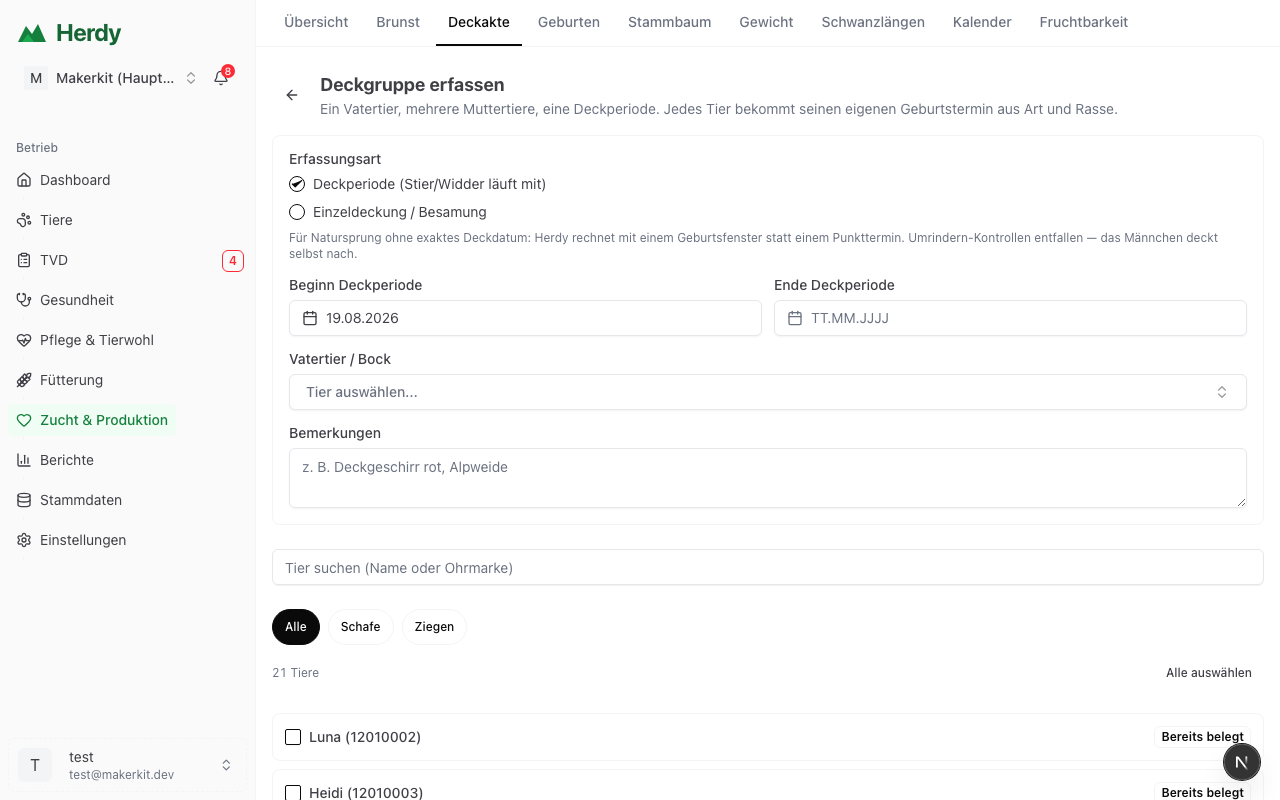
Creating a mating group
Go to Breeding → Matings and choose Record mating group.
1. Choose the recording mode
- Mating period -- the sire runs with the herd from-to. This is the normal case for natural service, for suckler cows and for sheep and goats.
- Single mating / insemination -- every animal was served or inseminated on the same day.
For a mating period Herdy works with a birth window rather than a single date. That is the honest answer: you do not know which day within the period the service happened.
2. Enter the period
Start and end of the mating period -- when the sire joined the herd and when he was taken out again.
3. Choose the sire
Once you pick the sire, Herdy narrows the dam list to the same species. A ram therefore cannot end up assigned to a cow.
For sheep and goats a hint appears showing how many dams this sire is good for -- more on that below.
4. Select the dams
Tap them individually, search by name or ear tag, filter by species, or use Select all.
Important: animals that already carry a running mating are marked Already mated and are skipped by Select all. That way one tap cannot create duplicates. To include such an animal anyway -- after a failed service, say -- simply tap it individually.
5. Save
Herdy creates a separate mating for every animal. That matters: each animal keeps its own due date, derived from its species and -- for cattle -- from its breed. A mixed group does not get one blanket date; every cow gets her own.
Who appears in the list?
Only animals that can actually be bred:
- female and not castrated
- in the herd or on the alp
- old enough (from the breeding age of the species)
If an animal has no birth date on record it still appears. Herdy cannot then know whether it is old enough -- and a missing animal would be worse than one you skip.
The sire capacity hint
For sheep and goats Herdy shows a recommendation under the sire, and warns when the group grows too large:
| Sire | Recommended number of dams |
|---|---|
| Young sire under 2 years | 15--30 |
| Experienced sire from 2 years | 30--50 |
These are the reference figures of the Swiss advisory and health service for small ruminants (BGK/SSPR). The warning is a hint, not a block -- you can still save the group.
Why it matters: according to BGK only 70--80 % of sires are genuinely ready at the start of the season. An overloaded or infertile sire costs a whole season, and you only notice when the lambing fails to arrive.
For cattle and pigs Herdy deliberately shows no such hint: there is no documented Swiss reference figure, and a guessed number would be worse than none.
Return-heat checks and mating periods
For a single mating Herdy schedules checks for whether the animal comes back into heat. For a mating period these are dropped -- the sire is running with the herd and re-covers a returning animal himself. Instead Herdy schedules the pregnancy check after the period ends.
Undoing a mating group
Right after saving, a message appears with an Undo button that removes the whole group again. Matings whose pregnancy has meanwhile been confirmed stay -- they already carry further records.
From the backwards planner into a mating group
Under Calendar → Year you will find the backwards planner: you say when lambing or calving should start and Herdy works out when the sire has to join the herd. A button there leads straight here -- with the period already filled in.