The animal profile shows everything Herdy knows about a single animal. Tap an animal in the animal list to open it.
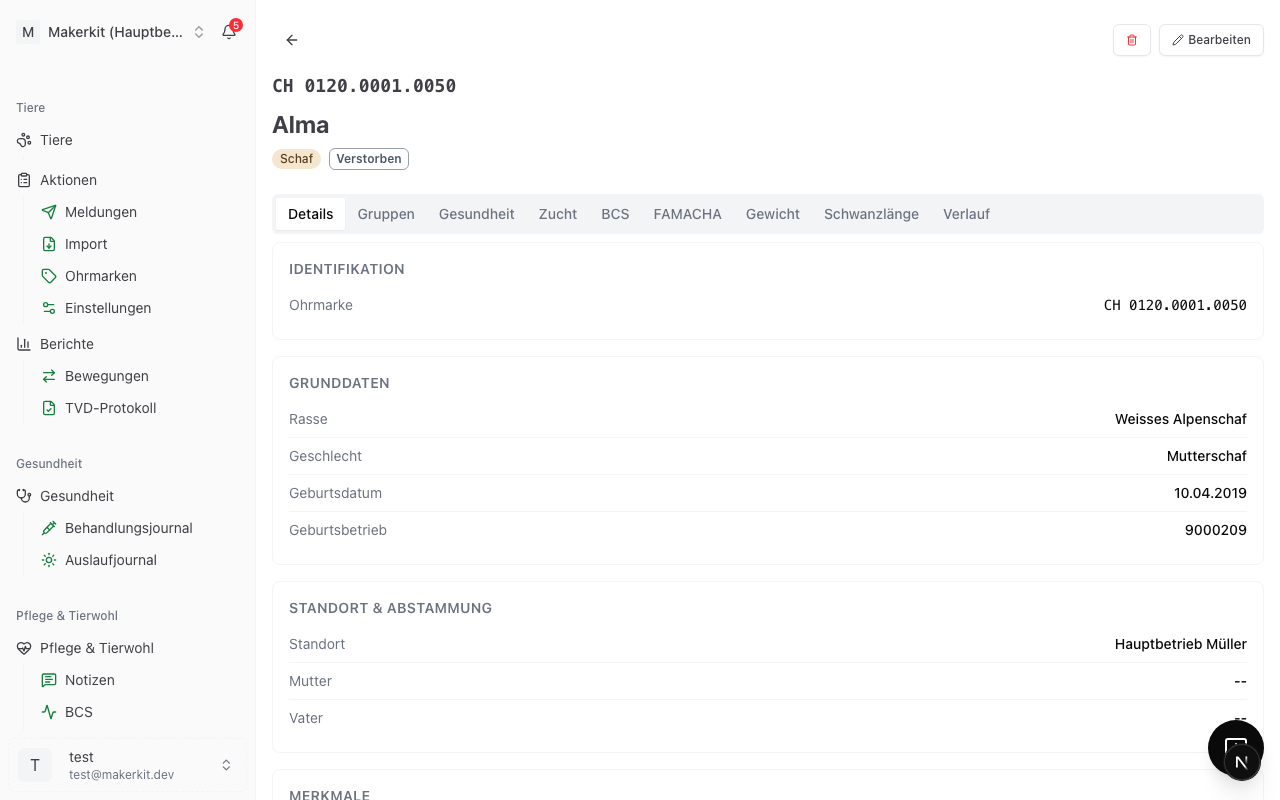
Header
At the top sits the ear tag in the spelling used for that species, below it the name or "No name". Badges follow:
- The species
- The status (Active, On alp, Departed, Deceased, Slaughtered, Missing)
- TVD, when the animal has been reconciled with the livestock traffic database
- For cattle, additionally the BVD status and the progress of the movement history
If a withdrawal period is running, a red warning banner appears right below with the date from which meat or milk is released again.
Actions at the top right
- + Record opens a menu with the four most common entries for this animal: Treatment, Weight, BCS / Body condition and Note. The animal is already preselected in each form.
- Edit opens the form with all fields, see Register and edit animals.
- Delete sits behind the three dots. It is deliberately not placed next to the daily actions.
On a phone there is an additional button at the bottom right that records a note about this animal straight away.
The tabs
Which tabs appear depends on the species and on the modules enabled for your farm.
| Tab | Content | Visible |
|---|---|---|
| Details | The animal's master data | always |
| Groups | Current and past groups | always |
| Health | Withdrawal periods and treatments | always |
| Breeding | Pedigree, matings, births, offspring | always |
| BCS | Body condition history | with the "Care & welfare" module |
| FAMACHA | FAMACHA score history | with the "Care & welfare" module, not for cattle |
| Weight | Weights and daily gain | always |
| Tail length | Measurements in centimetres | not for cattle |
| History | Timeline of all events | always, second in line for cattle |
"Details" tab
The data is grouped exactly as in the entry form:
- Identification: ear tag
- Basic data: breed, sex (in the species-specific term, so "Ewe" rather than "female"), castration date for castrated animals, date of birth, birth farm. For cattle, production type, milk production, first and last calving, the date the BVD status was checked, the state of the cattle passport and the state of the movement history are added
- Location & lineage: location plus dam and sire, each linked to their own profile
- Characteristics: colour, horn status and, except for cattle, tail length together with the last measurement in centimetres
- BCS: the recorded scores with their dates, if any
- Notes: your free text, if any
"Groups" tab
Current groups lists every group the animal belongs to today, each with the date it joined. Add to group assigns the animal to further groups, several at once if you like. Group history shows past memberships.
See Assigning animals to groups.
"Health" tab
Shows the withdrawal status and the most recent treatments and health events. From here you record a new treatment directly, or jump with Show all into the full treatment journal.
"Breeding" tab
Contains the mini pedigree with a link to the full pedigree, the most recent matings, the births the animal was involved in, and the list of offspring.
"Weight" tab
Shows the weight history as a curve, all entries with their dates and the daily gain in grams. New weighings are recorded here directly. See Weights.
"History" tab
A timeline of every event for this animal, most recent first. It records, among others, status change, location change, group joined and group left, BCS entry, note, treatment, vaccination, castration, hoof trimming, mating, birth, weight entry, tail length measurement, shearing, FAMACHA score, hoof check and death.
The history is kept automatically. Every action you record in Herdy shows up here without you having to add anything.
TVD actions at the foot of the page
Below the tabs sits the TVD block. It shows the most recent notifications for this animal with their status and offers the notifications that are currently permissible for this animal: Arrival notification, Departure notification, Death notification and, for sheep and goats, Slaughter. Notifications that are not permissible are greyed out; tapping one explains why.
The Slaughter button is a shortcut: it opens a departure notification with the reason «Slaughter». There is no separate slaughter notification, the slaughter notification to the TVD is always filed by the abattoir.
For cattle, Herdy does not report the slaughter itself, because the abattoir does that. Instead you record the intention to slaughter here.
If the animal has no ear tag yet, Assign ear tag appears at this spot. Use it to add the tag once the animal has been marked.
For cattle you also find the buttons Accompanying document and Refresh movement history. The second one re-fetches the movement history of all cattle on your farm from the TVD; the progress is shown at the top of the profile. What the movement history contains and what the dashboard tile Movement history stale means is described under Movement history. More about the notifications is under TVD notifications.
Deleting an animal
Delete sits behind the three dots at the top right and must be confirmed. Herdy refuses to delete an animal that has entries in the treatment journal or is recorded as the dam or sire of other animals. In those cases set the animal to Departed or Deceased.
Back to the list
The arrow at the top left takes you back to the animal list. On a phone use the back bar at the top of the screen.
Tip: If you want to carry on with the same filters, use your device's or browser's back function. The arrow opens the animal list without filters.