Overview
The movement history is the shared log of every event in your herd. Whatever you record anywhere in Herdy shows up here, no matter which module you entered it in.
You reach the page via Reports > Movements.
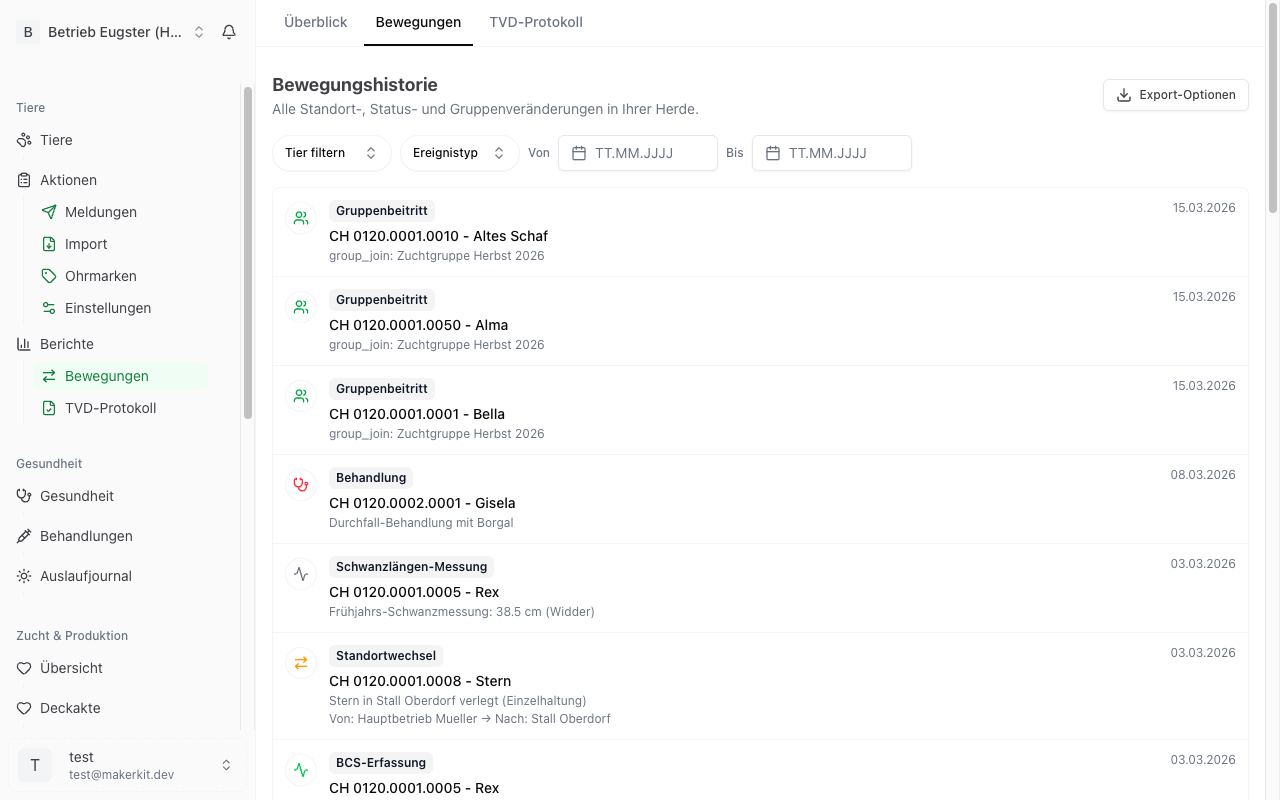
Which events appear
- Status change, for example from «Active» to «Sold»
- Location change
- Group join and Group leave
- Birth
- Treatment and Vaccination
- Castration
- Hoof trimming and Hoof check
- Mating
- Weight record and Tail length measurement
- BCS record and FAMACHA score
- Shearing
- Note
- Death
Reading an entry
Every row shows:
- An icon and a label with the event type
- The animal with its ear tag and, where present, its name
- A detail line, for example «Weight: 45 kg», «Litter size: 2» or «Finding: foot rot»
- On the right the date of the event and below it the initials of the person who recorded it
The newest events are at the top.
Tap a row and a detail panel opens with everything that was recorded. From there you can also reach the animal itself.
Filtering
The filter bar sits directly under the title. You can combine filters.
By animal
- Open the All animals selector.
- Pick an animal from the list.
Only one animal can be selected at a time.
By event type
Open the All types selector. Available are: status change, location change, group join, group leave, birth, treatment, mating and weight record.
The remaining event types are shown in the list but cannot be filtered individually.
By person
The All people selector only appears if more than one person is registered on the farm. It shows you what a particular person recorded.
By date range
Set a date in From and in To.
As soon as a filter is set, a Reset button appears that clears all filters at once.
Long lists
30 rows are shown at a time. If there are more, a Load more button appears at the bottom and shows the next 30 rows.
Export
- Set the filters you want first.
- Tap Export options at the top right.
- Choose Download CSV or Download PDF.
The file contains the columns Date, Animal (ear tag), Animal (name), Type and Description.
Important: only the page currently on screen is exported, so at most 30 rows. For a complete analysis, narrow the list with the filters first, for example to one animal or one month.
The history of a single animal
For a single animal there are two routes to the same information:
- Filter the movement history to that animal.
- Open the animal and choose the History tab, see Animal Profile.
Not to be confused: the «Movement history stale» card
Your farm dashboard carries a card titled Movement history stale. It means something other than the page described in this chapter.
The card counts cattle whose movement history has not been reconciled with the TVD for more than 30 days. The TVD keeps a movement history for every head of cattle, that is the list of every farm the animal has been on. Herdy fetches that list during a synchronisation and shows it in the animal profile.
This is how you refresh it:
- Tap the card. It takes you to the animal list, filtered to cattle.
- Open one animal.
- Tap Refresh movement history at the bottom of the page.
Herdy then queues every head of cattle on the farm. The reconciliation runs in the background; the header of the animal profile shows the progress and finally the message «Movement history up to date».
If the card reads 0 with «Movement history up to date» below it, there is nothing to do.