Overview
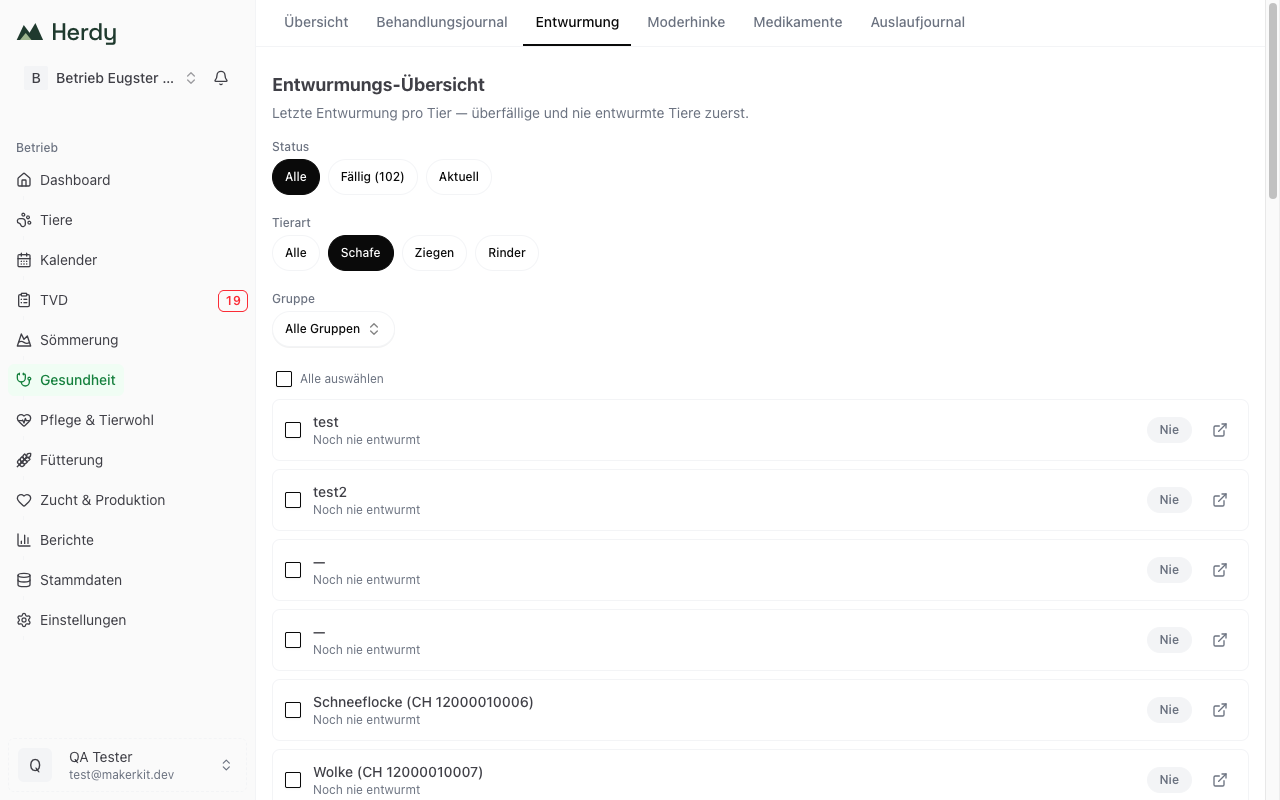
The Deworming overview answers a question that is tedious to read out of the treatment journal alone: when was each animal last dewormed? Herdy sorts the animals by urgency, overdue and never dewormed first, and you treat a selection straight from the list.
Requirement: mark a product as antiparasitic
Herdy recognises a deworming by the category Antiparasitic (deworming) on the product used. Without such a product the overview stays empty and tells you so.
- Go to Master data > Medications
- Open your deworming product
- Set the category to Antiparasitic (deworming)
All past and future treatments with that product then count as deworming. See Medications for the catalogue.
Reading the list
Every row shows the animal, the last deworming with date and product, and a coloured badge:
| Badge | Meaning |
|---|---|
| Never (grey) | Never dewormed |
| Days in red | Last deworming more than 180 days ago |
| Days in amber | Last deworming more than 90 days ago |
| Days in green | Dewormed within the last 90 days |
The thresholds are a rule of thumb for small ruminants, which are usually dewormed seasonally. They replace neither a faecal egg count nor your vet's advice.
The symbol at the right edge of a row opens the animal profile.
Filtering
Three filters are available:
- Status: All, Due with the count in brackets (never dewormed and overdue animals), or Up to date
- Species: All, Sheep, Goats, Cattle. The filter only appears on mixed herds.
- Group: a group from Master data > Groups. The filter only appears if groups exist.
The filters combine, for example «Due» and «Ewes», to show exactly the animals you will gather on the next treatment day.
Deworming animals
- Set the filters so that the animals to be treated remain
- Tick the animals, or use Select all
- Tap Deworm at the bottom
Herdy opens the group treatment with your selection and prepares everything: the type is set to Medication, the diagnosis to «Deworming», and the medication list shows only your antiparasitics. You pick the product, check the details and save.
If the product carries a rate per kilogram, Herdy asks for the weight of the heaviest animal in the group. Group treatments are dosed to the heaviest animal because underdosing drives resistance. See Recording treatments.
After saving, every deworming sits as its own journal entry on the animal, and the overview recalculates.
What the overview does not do
- It does not propose a treatment plan. When and with what you deworm is a decision for you and your vet, ideally based on faecal samples.
- It does not take FAMACHA scores into account. Selective deworming by FAMACHA is done under Care & Welfare > FAMACHA, see FAMACHA.
- It knows nothing about pasture history or the parasite burden of individual pastures.
Tip: combine the overview with the FAMACHA check. The day count says when an animal was last treated; FAMACHA says which animal actually needs it.