Overview
Before Herdy can load animals from the TVD or file notifications, you set up the connection once. It has two parts: connect the Agate account and link the TVD holding.
Everything lives under TVD > Settings. The page shows three cards: Agate connection, linked holding and synchronisation status.
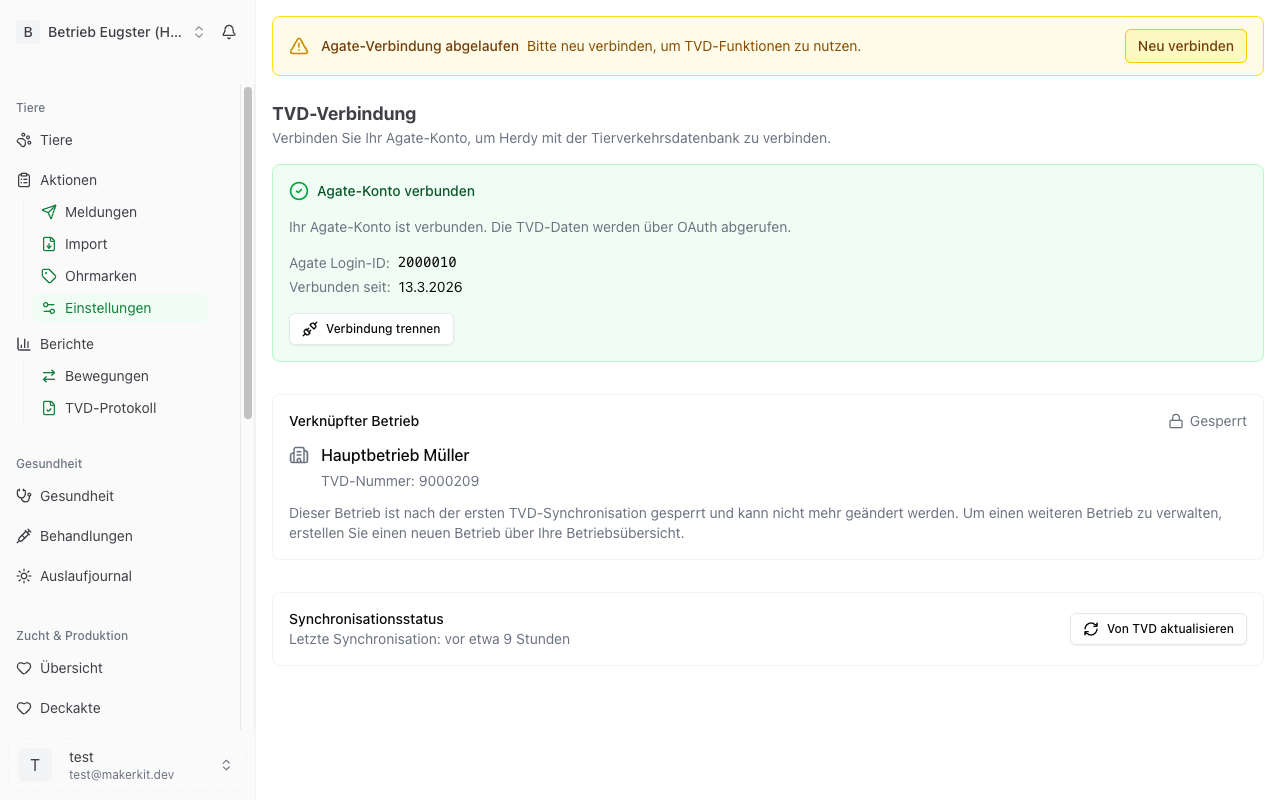
Step 1: connect the Agate account
Signing in happens on agate.ch itself. Herdy never sees your password.
- Go to TVD > Settings.
- Click Connect with Agate.
- You land on the agate.ch sign-in page. Sign in there.
- Afterwards you return to Herdy automatically.
- The card now reads Agate account connected and shows your Agate login ID and the connection date.
Renewing the session
The Agate session has a limited lifetime. Three days before it expires Herdy shows a notice at the top of the TVD module: «Agate session expires in x days». Click Renew now and sign in to agate.ch again.
Once the session has expired, the notice reads Agate connection expired with a Reconnect button. Until you have done that, import, synchronisation and sending notifications are blocked. Drafts can still be created.
Disconnecting
Under TVD > Settings click Disconnect and confirm. Your animal data stays in Herdy, the TVD functions rest until you connect again.
Step 2: link the TVD holding
One Agate account can be authorised for several holdings. Herdy needs to know which one belongs to this Herdy farm, because every notification carries its TVD number.
When you set Herdy up for the first time, the onboarding wizard walks you through the holding selection right after the Agate sign-in. You can also do it in the settings at any time:
- Go to TVD > Settings.
- On the Link holding card click Link holding.
- Herdy loads the holdings your Agate account is authorised for and shows TVD number, name and location.
- Pick your holding and click Link holding.
- Herdy asks: «Is this your holding?» and points out that it can no longer be changed after the first synchronisation. Confirm with Yes, link holding.
While no holding is linked, the TVD overview shows an amber notice and the Import from TVD tile on the import page is disabled and names the missing step.
Changing the holding before anything is synchronised
As long as you have not loaded any animals from the TVD, you can correct the holding:
- Open TVD > Settings.
- Under Linked holding click Change holding.
- Confirm the warning, choose the new holding and click Apply holding.
After the first synchronisation the holding is locked
As soon as animals from the TVD have arrived in Herdy, the card shows a padlock and the label Locked. This keeps your data from being reassigned to the wrong holding after the fact.
Tip: If you run several holdings, create a separate Herdy farm for each. Every one then gets its own TVD link.
Synchronising with the TVD
Synchronisation fetches the current herd and ear tag stock from the TVD and writes the differences into Herdy.
Starting a synchronisation
- TVD > Settings, card Synchronisation status, button Refresh from TVD.
- Or from the notification log via Synchronise now, when the notice «Last synchronisation …» appears there.
The card always shows when the last synchronisation ran, or «Never synchronised».
What synchronisation does
- New animals from the TVD are created.
- Existing animals are updated where fields differ.
- Animals the TVD reports as departed receive their leaving date and the matching status.
- The ear tag stock is brought up to date.
- Notifications that have meanwhile been entered directly in Agate are recognised and closed.
- A young animal recorded in Herdy without an ear tag is merged with the matching TVD animal instead of being created a second time. The merge only happens when species, sex and date of birth point unambiguously to exactly one animal.
Reading the sync history
On the TVD overview Herdy logs every synchronisation. Per entry you see:
- Trigger: Manual, Automatic or First connection.
- Status: Completed, partially completed or failed.
- Summary: How many animals were added or updated, and how many ear tags.
Show details expands the individual changes, for example which animals were newly imported and which fields were updated.
When the TVD does not answer for every species
Your Agate account is authorised per genus. If the authorisation for a genus is missing, the TVD refuses the query for exactly those animals. Herdy says so explicitly instead of quietly showing fewer animals:
- «The TVD refused the query for x species with existing animals.»
- «The TVD did not answer for any species.» In that case check your TVD number and your authorisations in Agate.
What the connection is needed for
| Function | Needs Agate session | Needs linked holding |
|---|---|---|
| Import herd from TVD | yes | yes |
| Synchronise herd | yes | yes |
| Send notifications to the TVD | yes | yes |
| Refresh ear tag stock | yes | yes |
| Create notifications as drafts | no | no |
| CSV import | no | no |
Without an Agate connection you can still use Herdy for herd management, only the direct TVD link rests.
Security
- Signing in runs through OAuth at agate.ch. Herdy does not store your password.
- Access tokens are stored encrypted and used only for the TVD interface.
- You can disconnect at any time.
Common problems
«Agate connection expired» The session has run out. Click Reconnect and sign in to agate.ch again.
«No holdings found» Your Agate account is not authorised for any holding. Clarify this with your cantonal veterinary office or with identitas.ch.
The holding can no longer be changed Once animals have been synchronised the link is fixed. If you really picked the wrong holding, write to info@herdy.ch.