Overview
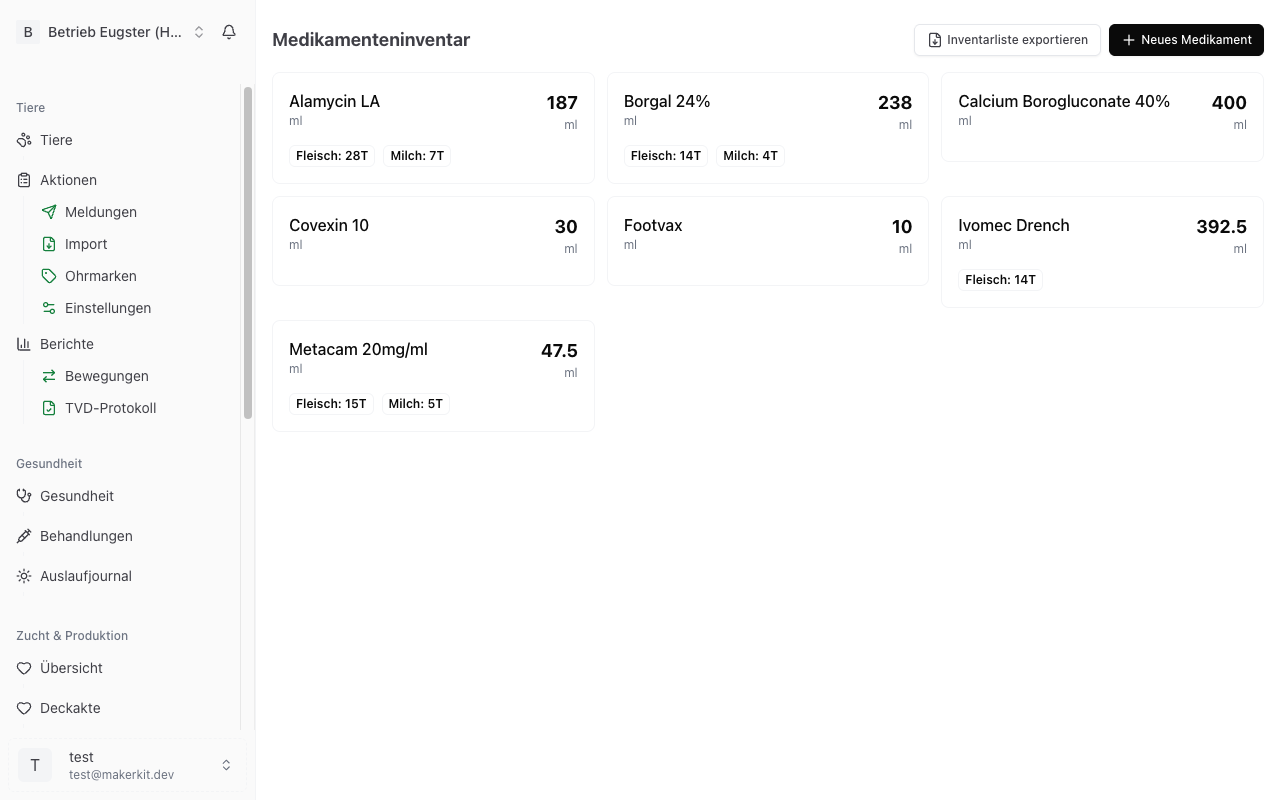
The Medication inventory holds every veterinary medicine stored on your farm. Each product carries its withdrawal periods, its default dosage and its stock level. Whenever you record a treatment, Herdy deducts the quantity used and derives the release dates from the withdrawal periods.
You reach the inventory under Master Data > Medications. Workers, family members and vets only see this area with access to the «Health» module.
This page covers managing the inventory. How to use a medicine in a treatment is described under Treatments; the health-side view of medications is under Medications in the Health section and the periods under Withdrawal Periods.
Why the inventory is mandatory
The Swiss veterinary medicines ordinance requires every farm that keeps medicines in stock to maintain an inventory list of receipts, returns and disposals. The records must be kept for three years. That is exactly the list Herdy produces from your entries, see «Exporting the inventory list».
Adding a new medication
- Go to Master Data > Medications.
- Tap New medication.
- Fill in the form and tap New medication.
Basics
- Trade name: the product name from the packaging, for example «Cydectin Pour-On».
- Active ingredient: for example «Moxidectin», «Oxytetracycline».
- Unit: ml, g, tablets, boluses, pieces or other.
- Category: Antiparasitic (deworming), Antibiotic, Anti-inflammatory or Other. The category decides where the product is later suggested. Only treatments with a product of the category «Antiparasitic (deworming)» count as a deworming in the deworming overview, see Deworming.
- Usual route of administration: oral, intramuscular, intravenous, subcutaneous, intramammary, intrauterine, topical, intraruminal or other. The value is prefilled on every treatment with this product.
Withdrawal periods
Three fields, all in days: Withdrawal period meat, Withdrawal period milk and Organ withdrawal. The values are on the package leaflet or come from your vet.
Herdy derives the release dates from them for every treatment. The first permitted day again is the day after the period expires, counted from the last application.
Important: Enter the periods carefully. A wrong value produces wrong release dates and therefore a residue risk.
Organic classification
The Organic classification section appears on every farm, not only on organic ones. That way the catalogue is already classified correctly should you convert later.
- Antibiotic: fills the mandatory «Antibiotics» column of the organic treatment journal.
- Chemically synthetic allopathic medicine: on by default. On organic farms Herdy doubles the withdrawal period for such products. Uncheck it for phytotherapy and homeopathy.
- Critical antibiotic class (Bio Suisse): cephalosporins 3rd/4th generation, macrolides or fluoroquinolones. Leave empty if the product is not in a critical class. Bio Suisse updates the list every year.
- Dry-off product (udder problems): the only carve-out from the doubling.
- Counts toward the organic treatment limit: on by default. Uncheck it for antiparasitics, anaesthetics and painkillers, and for treatments under state disease-control programmes.
On an organic farm the list also shows badges: «Phyto/homeopathy», «Dry-off», «Not counted» and «Critical AB». On a conventional farm they stay hidden.
Dosing
- Dosing basis: «Per animal» or «Per kg body weight». If the label states a rate such as «1 ml per 10 kg», choose «Per kg body weight».
- Default dosage: the number that goes with it. The unit sits inside the field so the number stays unambiguous later. With «Per kg body weight», Herdy shows below the field what that comes to per 10 kg and per 50 kg. Compare that line with the label.
- Notes: free text, for example storage instructions.
Editing a medication
- Open the product from the list.
- Tap Edit medication.
- Change the fields and tap Save changes.
The Category can also be changed straight on the detail page, without going through the form.
Keeping stock
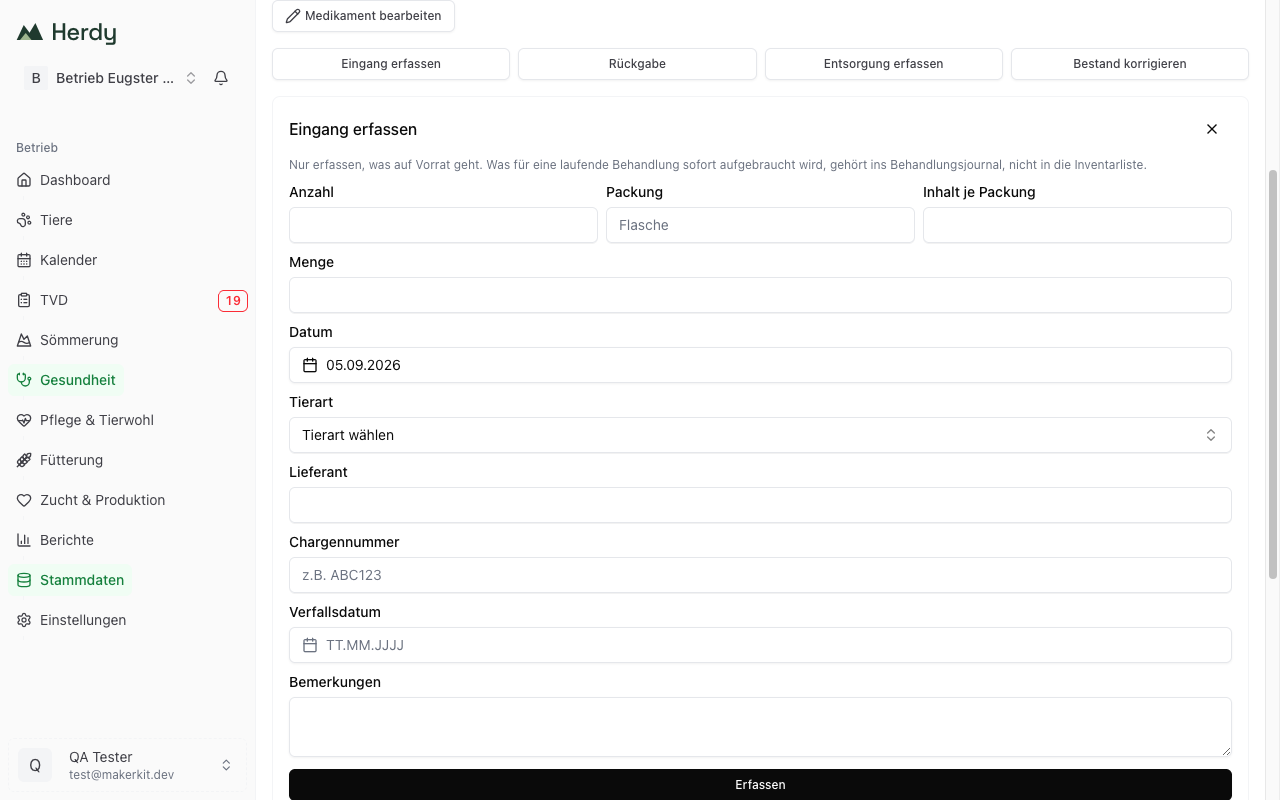
The stock level is built from individual movements. The detail page offers four buttons for them.
Record receipt
For every purchase from the vet:
- Open the medication and tap Record receipt.
- Enter the packaging: Count, Package (for example «Bottle») and Content per package. Herdy calculates the quantity from that and shows it. If you do not know the packaging, enter the Quantity directly instead.
- Set the Date of the purchase.
- Choose the Species the stock is intended for. If your farm keeps only one species, the question does not appear. The inventory list needs this because a separate set of sheets is kept per species.
- Enter Supplier, Batch number and Expiry date.
- Tap Record.
Important: Only what goes into stock belongs in the inventory. Anything the vet brings along for a current treatment and uses up immediately belongs in the treatment journal, not in the inventory list.
Return
If you hand an opened or expired package back to the practice, record a Return. Under «Which receipt does this concern?» pick the matching receipt, and under Returned to enter who took the package back. The official form prints receipt and return on the same row.
Record disposal
If a product is destroyed, record Record disposal, again with the receipt and, if known, the person under Disposed of by.
Adjust stock
If the displayed stock does not match the cabinet, tap Adjust stock, choose Decrease stock or Increase stock under Direction and enter the difference. An adjustment is a bookkeeping aid, not a record for the inspection. Where a return or a disposal actually happened, record that instead.
Treatment
When you use the product in a treatment, Herdy books the quantity out by itself. The movement list shows the entry as «Treatment». You do not need to do anything extra.
Keeping an eye on stock
- The list shows the current stock per product. If it drops to zero or below, the number turns red.
- On the detail page a negative stock is flagged with «Stock is negative» and a button to correct it. A negative stock is always a bookkeeping error, usually a missing receipt.
- The movement list below the form shows every entry with date, supplier, batch and expiry date.
Archiving a medication
If you no longer use a product, take it out of the catalogue:
- Open Edit medication.
- At the bottom, under Remove from catalogue, tap Archive and confirm.
Archived products no longer appear when selecting a medicine for a treatment. All recorded movements stay in place and remain on the inventory list, as the ordinance requires.
As long as stock remains, archiving is blocked. Herdy shows the remaining stock instead and points you to the right path: either the package is still in the cabinet and belongs in the inventory, or it is gone and needs a «Return» or «Disposal» entry. With a negative stock Herdy asks you to correct it to zero first.
Archived products are reachable through Show archived in the header of the list. If you buy the product again, tap Restore to catalogue instead of creating it anew. That keeps the movement history in one piece.
Exporting the inventory list
Export inventory list in the header of the list opens the Veterinary medicine inventory list page. It produces the AGRIDEA standard form with all mandatory fields, one set of sheets per species.
- Standard form as PDF: the form to print and file.
- Inventory list as CSV: the same columns as a spreadsheet.
Each row carries the purchase date, the trade name, the quantity purchased and the person who dispensed it; return or destruction sits next to it. Treatments and adjustments are deliberately left out, they belong in the treatment journal.
If you have not recorded any receipt yet, the page tells you that the inventory list is only required when medicines are stored on the farm.
Under Other exports you also find all stock movements per medication as PDF or CSV. That list is meant for your own bookkeeping, not for the inspection.
The standard form is recognised among others for TAMV, QS Milch, QM-Schweizer Fleisch, IP-SUISSE, TerraSuisse, Coop Naturafarm, Mutterkuh Schweiz and Agri Natura.
Tip: Book every purchase on the day you receive it. Then your digital stock always matches the cabinet, and the inventory list is ready at the press of a button.