Overview
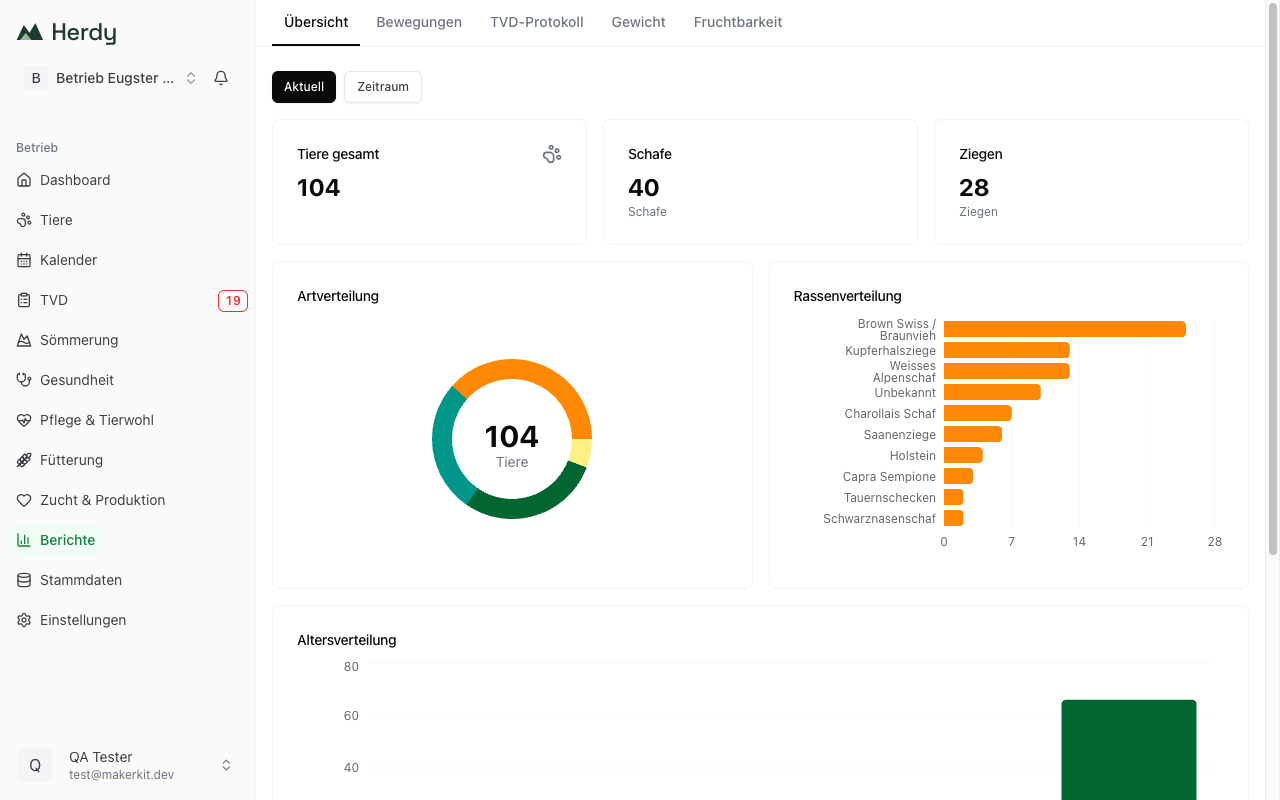
The Overview tab shows the current state of your herd on one page. You reach it via Reports > Overview.
Every figure on this page describes today's herd. Counted are animals with the status «active» and animals that are on the alp. Animals that have left, been sold, died or been slaughtered are not included.
The two buttons «Current» and «Date range»
Above the cards there are two buttons:
- Current is the default view and shows today's herd.
- Date range additionally reveals the buttons This month and This year plus two date fields.
Good to know: the figures and charts on this page always describe today's herd. A selected date range does not change them at the moment. If you need figures for a particular period, use the Movement History with its From and To fields.
The stat cards
Three cards sit at the top:
- Total animals is the number of all active animals across every species, that is sheep, goats, cattle and pigs together.
- Sheep is the number of active sheep.
- Goats is the number of active goats.
Cattle and pigs have no card of their own. You read their numbers off the Species distribution chart. So if «Total animals» is higher than sheep and goats together, the cattle and pigs are in the difference.
The charts
Species distribution
A doughnut chart with the ratio of sheep, goats, cattle and pigs. The total sits in the middle. Hover or tap a segment to see the exact count.
Breed distribution
A bar chart with every breed in your herd, sorted by count. Animals with no recorded breed appear as Unknown.
Herdy merges breeds that reach it from different sources: a breed entered by hand and the same breed from the TVD synchronisation form a single bar.
Age distribution
A bar chart with five age brackets:
- < 6 months
- 6-12 months
- 1-2 years
- 2-4 years
- 4+ years
Animals without a recorded date of birth appear in no bracket. If the bars add up to less than «Total animals», some animals are missing their birth date.
Births & losses (12 months)
A card with two figures for the last twelve months:
- Births counts every birth you recorded in that period.
- Losses counts animals recorded as died or slaughtered. Sold animals are not included here.
Exporting the report
- Tap Export options at the top right.
- Choose Download CSV or Download PDF.
Exported are the figures as pairs of values: total animals, sheep, goats, births, losses, plus every breed and every age bracket with its count. The PDF carries the title «Herd overview» and the line «Exported on» with today's date.
Tip: export the herd overview as a PDF at the end of the year. That way you have the herd on the reference date in black and white, even after the herd has changed.