If several farms send animals to the same alp, they agree the details directly in Herdy. The alp operation sends a stocking request, the consignor answers, and afterwards both sides prepare the same handover.
Stocking requests
The Requests workspace keeps received and sent requests separate but side by side.
Send a request as an alp operation
- Open Alp planning, choose the alp season and click Send request under «Stocking requests».
- Enter Consignor / farm and optionally the email address.
- Record the proposed animal groups: Animal category, Count, Arrival and Return. If age or use, and with it the category, changes during the summer, split the period into two rows. Ear tags are not needed yet.
- Optionally note agreements about delivery or collection under Terms and notes.
- After Create request you receive a secure reply link. If you entered an email address, Herdy also sends it by mail. The link is valid for at most 30 days and never beyond the end of the season.
A request has the status Awaiting the consignor's reply, Counter-proposal received, Firmly committed, Declined, Withdrawn or Expired. Herdy always says who is next. You can create a new link at any time (which invalidates the old one), resend the invitation or withdraw the request.
Answer a request as a consignor
Claimed requests appear under Requests as «Requests from Alps». For each request you see the alp, the summering year, the alp TVD number and the proposed animal groups. Three answers are possible:
- Confirm acceptance: the consignment becomes binding and preparation of the ascent starts.
- Suggest a change: you adjust animal groups or periods; the alp then decides.
- Decline
An acceptance is automatically taken over on the alp side as a binding consignment.
Animal handovers
The Handovers workspace lists all confirmed consignments, split into Handovers as alp operator and Handovers as consignor. Each card shows the consignment dossier: how many animals are assigned, which phase the handover is in and who takes the next step.
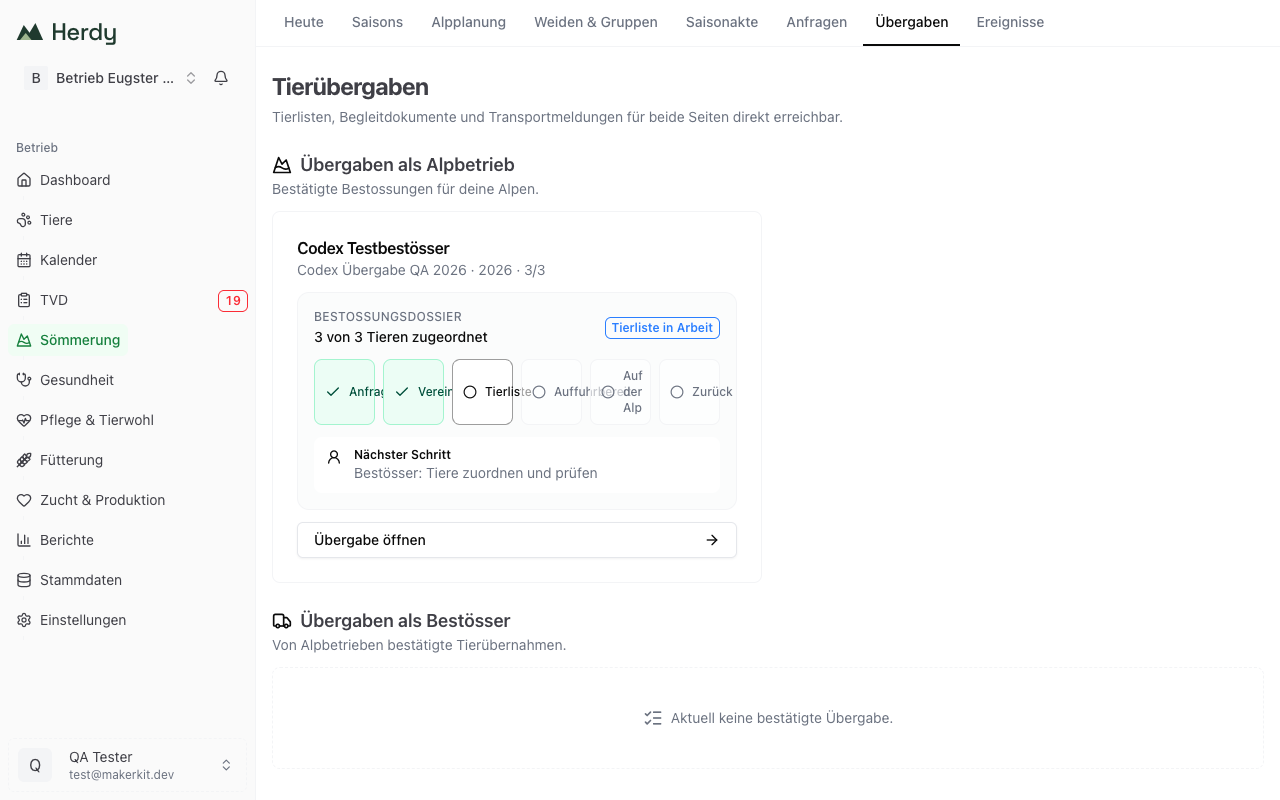
The phases run from Request open through Agreed, Animal list, Ready for ascent and On the alp to Returned.
Animal list
Before the ascent the agreed count becomes a concrete animal list:
- Paste ear tags: one ear tag per line, or upload a CSV or TXT file. Herdy checks format, duplicates and the agreed count before saving.
- Choose from herd: the consignor picks the animals directly from the Herdy herd; matching species and age category are shown.
Animals that are not unambiguously confirmed as matching active animals land under review with the reason: birth date missing, check category, assigned more than once, not active, ear tag missing, not in the Herdy herd, species does not match, or confirm usage. The intermediate state can be saved but does not yet count as ready for ascent.
For adult sheep and goats you additionally confirm whether the animals are milked on the alp. This applies to the alpine stay only and does not change the master data.
Preparation
Two points make it visible to both sides whether things can start:
- Accompanying document is prepared. Herdy calculates the state automatically from the recorded transports and their current document versions.
- Arrival is coordinated. Date, handover location and responsible person are agreed.
Transports and accompanying documents
For each transport you record a lot with direction (ascent or return), planned transport date and the animals involved. For every transport you file the accompanying document:
- Upload document: PDF, JPEG or PNG up to 15 MB. Earlier versions remain traceable.
- Create official TVD document: Herdy creates the official documents directly at the TVD and files them. This step creates documents only and files neither a departure nor an arrival. Sheep are processed together, cattle one by one. For goats there is no official document; upload a manual record instead. For female cattle from 450 days the TVD additionally requires a statement about pregnancy. Official documents are only possible for a transport date of today or tomorrow.
If the transport changes afterwards, Herdy points out that a new document version is needed. As soon as TVD notifications exist for a transport, it can no longer be edited.
The four TVD notifications of a handover
Over the summer a consignment produces four notifications, each from a specific farm:
| Notification | Who files it |
|---|---|
| Departure to the alp | Consignor |
| Arrival on the alp | Alp operation |
| Departure from the alp | Alp operation |
| Arrival at home | Consignor |
Herdy keeps them in the right order: the arrival on the alp requires the confirmed departure, the return requires the confirmed departure from the alp. Before sending you confirm the actual transport date in the dialog and that the transport took place. A current accompanying document is a prerequisite.
If a notification type is unavailable in the TVD, such as the arrival for goats, Herdy records it with Reported in the Agate portal and the reporting date.
Answer the grazing fee draft
After the season the alp shares its grazing fee draft. As a consignor you see it with the request, including animals, animal days, NST, price agreement and amount. You can accept the draft or raise a question and state what the alp should check.
The draft is not an invoice and triggers no payment.
Treatments on the alp
If your animals were treated on the alp, you see the necessary extract from the alp's treatment journal with the request, including the withdrawal period for meat and milk.