Tail length is a breeding trait in certain sheep breeds. In Herdy you record the measurements individually or as a group, follow the development in a chart and export the data.
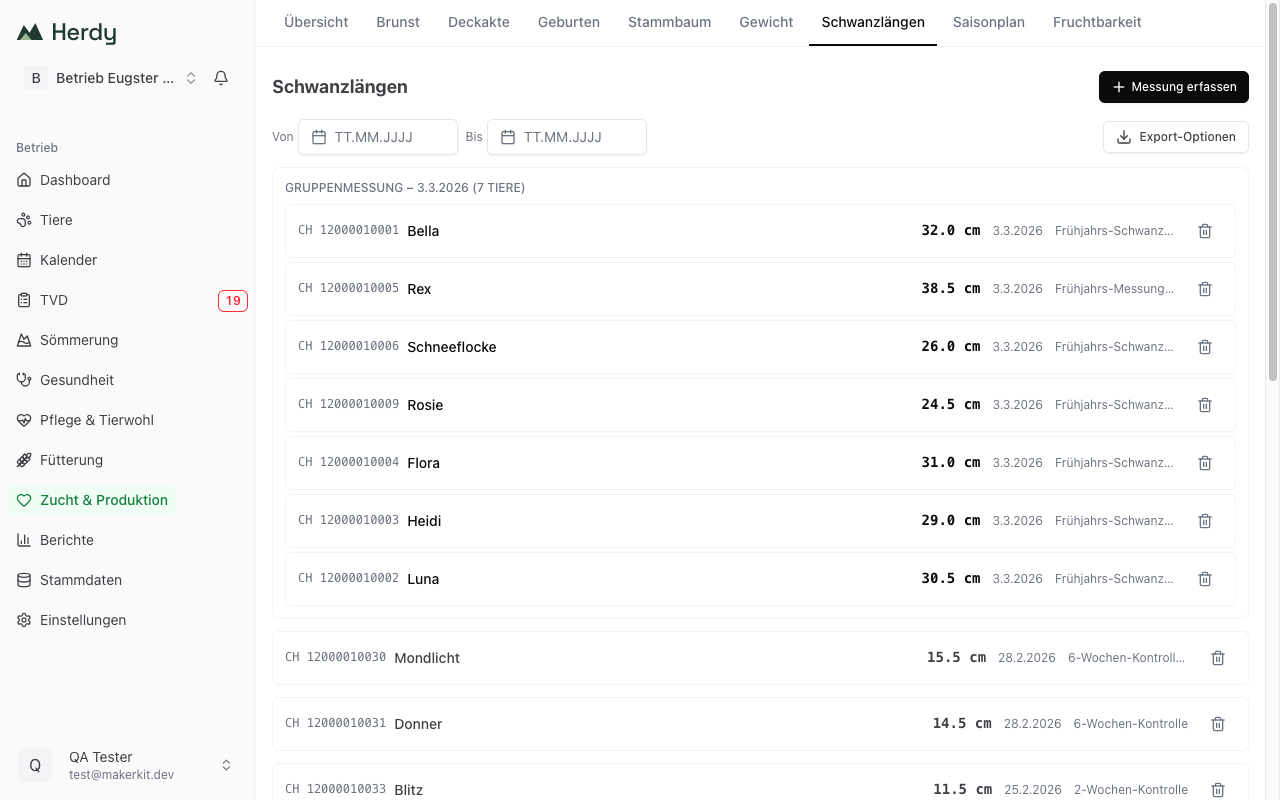
Recording a tail length
- Go to Breeding and choose the Tail Lengths tab.
- Tap Record measurement.
- Choose the animal from your herd.
- Enter the Length (cm), for example 18.5.
- Choose the Measurement date.
- Optional: add Notes, for example "2-week check".
- Tap Save.
Values between 0.5 and 60 cm are allowed, in steps of 0.5 cm. Herdy says so if a value falls outside.
Group measurement
Several animals in a row are measured fastest in a batch session under Actions. Choose Tail length as the session type there and work through the animals; how that works is described in Batch sessions.
All measurements from such a session appear in the list as one block with date and number of animals, for example "Group measurement – 3.3.2026 (7 animals)".
Chart
Open an animal in the animal registry and switch to the Tail length tab. There the Growth chart shows this animal's development over time:
- X axis: measurement date
- Y axis: length in centimetres
That way you see the growth at a glance.
Filtering and exporting
The list can be narrowed to a period using the From and To date fields. The active filter appears as a chip you can remove again.
Export at the top right exports the displayed measurements as CSV or PDF. Ear tag, name, length (cm), date and notes are included.
Deleting an entry
If you recorded a measurement by mistake, remove it with the bin icon in the row. Herdy asks first, because the measurement is deleted for good.