During lambing season every minute counts. Nobody wants to fill in a form for each of sixty or six hundred ewes. With Lambing by scan you work through the pen the way you walk it anyway: scan the dam, scan the lambs, tap the sex, move on to the next animal.
Requirements
- An ear tag reader paired with your phone or tablet, or camera recognition. How to connect a device is described in Bluetooth reader.
- Sheep or goats with Swiss ear tags. Foreign tags are rejected, because they cannot produce a Swiss TVD birth notification.
- The lambs are already tagged. A lamb without a tag can still be recorded, see below.
Opening the page
Breeding → Births → Scan lambing. The button is available even when no birth has been recorded yet, because that is exactly the situation on the first day of the season.
Step 1: set up the session
Everything that applies to the whole round is asked once at the start. After that no question interrupts the scanning.
- Birth date: applies to every litter of this session. Today is proposed.
- Sire unknown: switched on by default. On a flock farm the ram runs with the ewes and nobody knows which lamb came from which sire. The TVD accepts "unknown"; a guess would be worse than nothing.
- Sire: appears as soon as you switch "Sire unknown" off. The chosen sire then applies to every litter of this session.
Start scanning gets you going.
Tip: if you lamb several pens with different sires, run one session per sire. That is faster than correcting the sire on every lamb afterwards.
Step 2: scan dam and lambs
The routine is always the same:
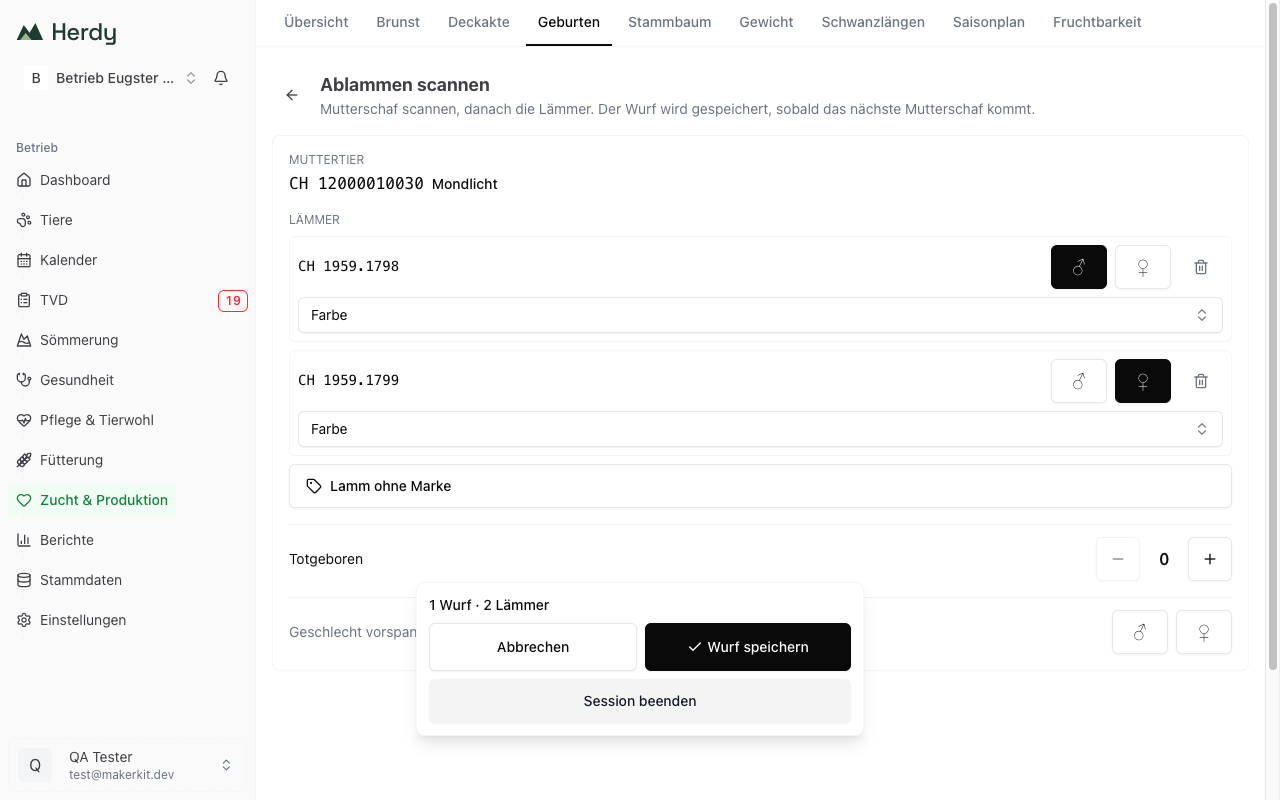
- Scan the dam. Herdy opens a litter and shows the animal's ear tag and name.
- Scan the lambs. Each lamb appears as its own row.
- Tap the sex, male or female. That is the only mandatory entry per lamb.
- Scan the next dam. That saves the previous litter and starts the next one.
So you never press "done". The next dam is the signal.
What else you can set on a litter
- Colour: sheep only. The TVD has no colour list for goats, so the selector does not appear there.
- Lamb without tag: adds a lamb with no ear tag. The animal is created; the TVD notification stays incomplete until you add the tag on the animal profile.
- Stillborn: a counter with plus and minus. Stillbirths count towards the litter size but get no animal and no TVD notification.
- Preset sex: if several lambs in a row share the same sex, choose it once here. Every lamb scanned afterwards gets it automatically.
- Bin icon: removes a single lamb row.
Saving and undoing
At the bottom sits a bar with the running count ("3 litters · 7 lambs") and three buttons:
- Save litter: closes the open litter without a new dam arriving.
- Cancel: aborts the session. Litters already saved stay, the open litter is lost.
- End session: saves the open litter and shows the summary.
When a litter is closed by scanning the next dam, an Undo button appears for a few seconds. It reopens the litter as long as nothing has been recorded on the new one.
Saving is only possible once every lamb has a sex and no tag already belongs to another animal. The bar says what is missing.
What Herdy reports while scanning
Herdy decides for every scan whether it is a dam or a lamb. If something does not fit, a red message and an error tone appear instead of nothing happening quietly:
| Message | What it means |
|---|---|
| "Scan the ewe first." | No litter is open yet. |
| "This animal is already in the herd." | The tag belongs to an animal that cannot be a dam, a ram for instance. |
| "This ewe already has a litter today." | The animal was already scanned in this session. |
| "Not a valid ear tag." | What the reader sent is not an ear tag. |
| "Only Swiss ear tags can be used for a TVD birth notification." | A foreign tag. |
| "This ear tag does not match the dam's species." | A goat tag in a sheep litter or the other way round. |
| "This tag already belongs to an animal." | The tag is already taken in the herd. The row blocks saving until you remove it or scan the right lamb. |
Ear tag stock: a tag that is not in your ear tag stock is still accepted. You buy more, reorder, or fall back on an older delivery, and stock must never hold up a lambing. The stock is reconciled after saving.
What gets saved
When a litter closes, Herdy creates in one go:
- the birth with date, dam, sire (if set), live and stillborn counts,
- one new animal per live lamb with ear tag, sex and colour,
- the parentage on the young animal,
- one TVD birth notification draft per live lamb with an ear tag; for a lamb without a tag the draft stays incomplete until you add the tag.
You find the drafts under TVD → Notifications and send them from there. A birth notification is due within 30 days; arrivals and departures, by contrast, within three working days.
That is why the end of the session says: "X litters recorded. The TVD notifications are ready as drafts." Recorded does not mean notified.
What the scan route does not record
Birth weight, birth ease, mothering score, foster dam and the young animal's name are deliberately not asked. In the barn, with gloves on, across fifty litters a day, every extra entry costs more than it delivers.
If you need those details you have two options:
- Record the litter through Recording births, where the full form is available.
- Or add them afterwards: birth ease and mothering score via Edit on the birth, weight and name directly on the animal.
When a litter cannot be saved
If the network drops or the server rejects a litter, the card stays on screen with a red message and the Try again button, right next to the open litter. You can keep scanning and catch up once you have reception again. Nothing is lost, and a double tap never creates a second litter.
Large flocks
The page is built for farms with more than a thousand dams: the herd is loaded once when the page opens, after which Herdy decides every scan immediately on the device, without waiting for the network. You can scan as fast as you walk the animals.