Alp planning is the alp operation's workplace. It answers the question of how many foreign animals you can take in this summer without exceeding your normal stocking.
Requirements
- The «Summer pasture» module is enabled for your farm.
- Herdy has set up alp access for your farm for the season year. Without it, «Alp planning», «Pastures & groups» and «Season record» do not appear at all. Contact info@herdy.ch.
- Alp access has two windows: while planning runs you can create seasons, consignments and requests. Afterwards comes close-out: new planning is locked, handovers, documents and closing work remain available. Existing data always stays readable.
Foot rot status
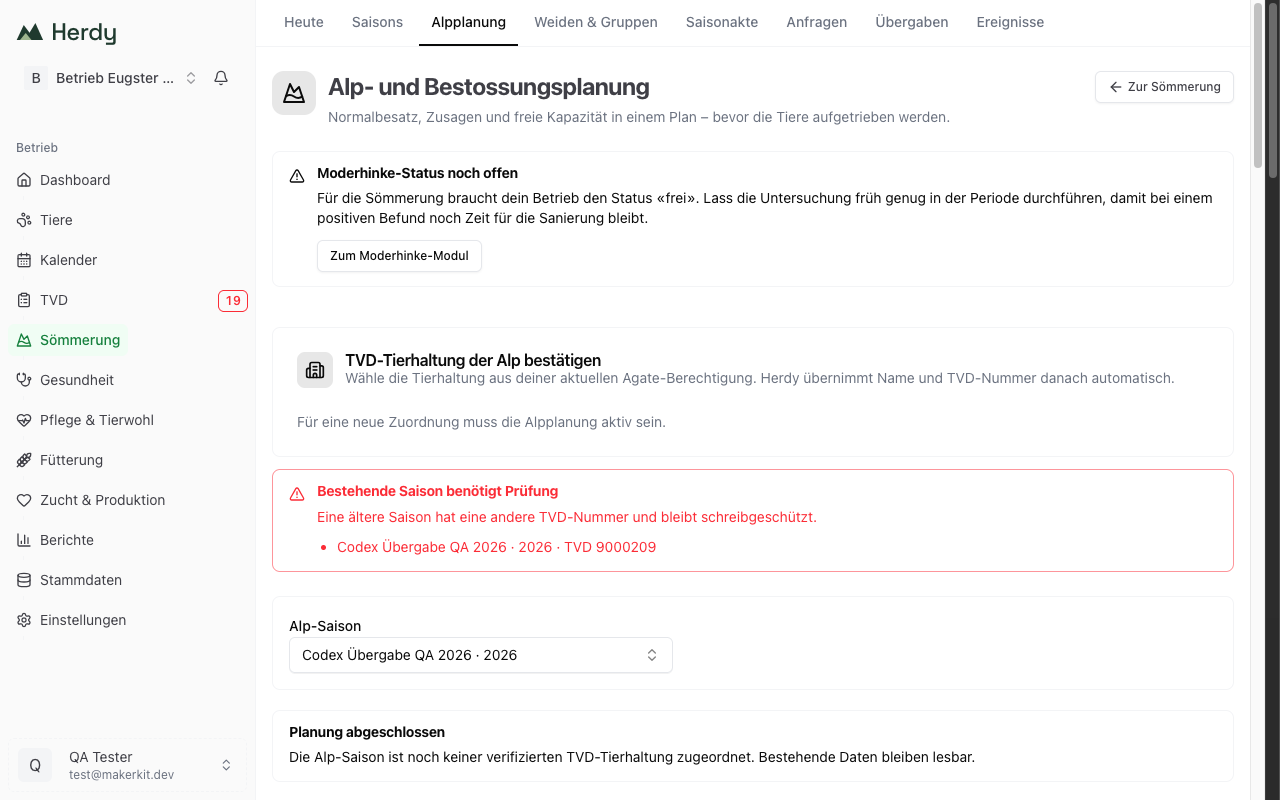
Only holdings with the status «free» may summer. If your farm's status is still open or blocked, Herdy warns at the top of the page.
With blocked, alpine grazing is not possible: the alpine subsidies are forfeited, and the quarantine does not count as force majeure under Art. 106 DZV. The cantonal veterinarian may grant an exception. That is exactly why Herdy blocks nothing, because the cantonal veterinarian can license an alp that takes only animals from blocked holdings.
With not tested, you need the status «free» before the animals go up. Have the examination done early enough in the period so that a positive result still leaves time for remediation. Your own status and the control programme are described under Footrot.
Confirm the alp's TVD holding
Before you plan, link the alp to a verified TVD holding:
- Load holdings from Agate. Herdy shows the holdings your Agate access is authorised for.
- Select the right one and click Confirm this holding. Herdy takes over name and TVD number automatically.
Before official notifications Herdy re-checks the Agate authorisation. Older seasons with a different TVD number stay readable but write-protected.
Normal stocking from the decision
The official normal stocking is recorded once for the alp operation, not per season. You enter the details from the cantonal decision:
- Status: definitive or provisional
- Decision reference and optionally the decision date
- Valid from and Valid until
- The authorised NST per subsidy category: «non-milk sheep» with continuous herding, rotational grazing or other grazing, plus «other roughage-consuming livestock»
New seasons take over this state as an unchangeable snapshot. Without at least one subsidy category no season can be created.
Create an alp season
Under New alp season you set the period and the internal planning allocation. The valid normal stocking is taken over automatically as a snapshot.
The internal planning allocation distributes the available plan value across the animal categories you actually work with. It does not change the official normal stocking.
Above it Herdy shows the key figures:
- Authorised: normal stocking according to the decision
- Plan value: your internal allocation
- Confirmed: firmly committed consignments
- Requested: requests not yet confirmed
- Remaining: what is left after confirmed and requested
There is also the expected utilisation as a bar. If things get tight, Herdy warns with «Capacity almost exhausted» or «Stocking above normal stocking». The table Capacity by animal category shows in its last column how many additional animals would still fit for a whole season.
While details are missing, Herdy works with a range and says why: either birth date or usage of individual animals is missing, or not all concrete animals are assigned yet.
Record consignments
A consignment is the agreement with one consignor. You either record it directly (after a phone call, say) or let it arise from an accepted request.
When recording directly you note Consignor / farm, its TVD number, the commitment (Requested, Confirmed, Cancelled) and how the agreement came about. Then follow the animal groups: per row Animal category, Count, Arrival and Return. If age or use changes during the stay, split the period into two rows. A category segment may cover at most 180 chargeable days.
For sending requests to consignors see Requests and handovers.
Check a scenario
If a consignor calls before you commit, open Check scenario. You enter the additional animal groups and immediately see Currently remaining, Scenario requires, Remaining afterwards and the assessment Fits, Tight or Over capacity. The scenario stays local in your browser, changes no consignment and triggers no TVD notification. You can export it as CSV.
Profitability and field comparison
From the same stocking plan Herdy calculates two views: Safe state (confirmed consignments only) and If everything materialises (confirmed plus open planning). Per view you see effective NST, summering subsidy, grazing fee, costs and result.
You record your assumptions under Edit assumptions:
- Grazing system for non-milk sheep: continuous herding, rotational grazing or other pasture
- Individual herd protection and the approved animal groups
- Charge grazing fee per animal and season, animal and day, or NST, with the matching price
- Seasonal fixed costs and variable cost per animal and day
Herdy reports utilisation in bands and says what to do: below 75 percent the canton may lower the normal stocking after three years, above 110 percent a 25 percent reduction applies, above 115 percent the base contribution can be lost.
Under Compare with official practice you enter values from AniCalc or a cantonal calculation. Herdy keeps them as a separate reference and explains the difference to its own calculation.
Profitability is a planning forecast. AniCalc, the TVD and the cantonal decision remain authoritative. The home farm's alpine grazing payment and the alp's summering subsidy are never mixed.
Repeat a season
For the next season, take over the reusable planning with Review previous year. Herdy shows beforehand exactly what is carried over and what deliberately starts fresh:
| Carried over | Starts fresh |
|---|---|
| Normal stocking categories | Ear tags and concrete animal lists |
| Recurring consignments, all set back to «planned» | Decision, AniCalc and cantonal values, accompanying documents |
| Private price and cost assumptions | Invitations, acceptances and TVD notifications |
No invitation is sent and no TVD notification is triggered.