Overview
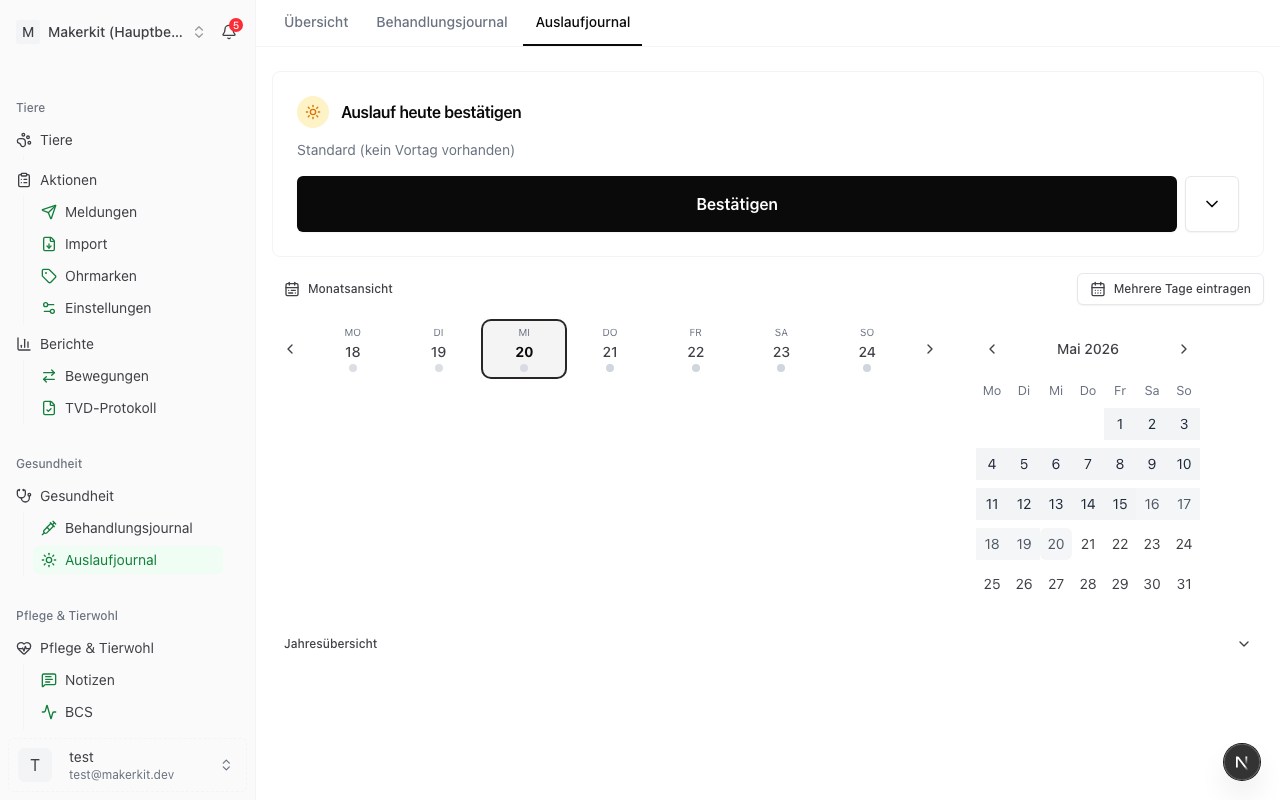
The exercise log proves on which days your animals were outdoors. You keep it per animal category (for example ewes, dairy goats, young stock) rather than per animal, exactly as the official pasture and exercise journal is built.
Herdy counts your days against the rule that applies to your farm and your species: RAUS, the pasture contribution, or the organic requirements. You can see at any time how many pasture and exercise days have accumulated in the current month.
First: is the journal up to date?
A status line sits at the very top. It is the most important number on the page, because the most common finding at an inspection is not too little outdoor access, it is a journal that was not kept up to date.
The Direct Payments Ordinance requires a day to be recorded within three days (Annex 6 B, 1.6), and the journal is the one document that may not be handed in late (Annex 8, 1.3). Herdy therefore reports per category:
- Journal is up to date: everything up to yesterday is recorded; today is open, as it may be
- … days not yet recorded: days are missing, all still within the deadline
- … the oldest must be recorded today: the deadline for the oldest open day expires today
- … the three-day deadline has passed: the oldest open day is late
Does the journal cover every animal?
Below it, a notice appears when needed: «… animals are in no journal category.» At an inspection the documentation only counts if it covers every animal of the category. The link Review animals leads to the animal list.
Herdy can only check this if at least one category is linked to a group. Without a link, Herdy does not know which animal belongs to which category.
Filtering
Above the confirmation card sits a filter with three axes: Species, Group and Programme. It applies to everything below it: the confirmation card, the calendars, the monthly progress and the export.
On a mixed farm you can use it to show only the sheep while you are working with the sheep in the morning. The status line and the coverage notice stay unfiltered, because they speak for the whole farm.
Confirming today's exercise
- Go to Health > Exercise Log
- The card Confirm today's exercise suggests what applied yesterday, and if there is no previous day, pasture in summer or the exercise yard in winter
- If the suggestion is right, tap Confirm
- If a category differs, expand the card with the arrow. The categories are grouped by species; per category you choose Pasture, Exercise yard or No exercise
- Finish with Confirm
Reason for the exercise yard instead of pasture
If you choose Exercise yard, Herdy asks for the reason:
- Bad weather
- Spring, pasture not yet grazeable
- Dry-off period
With a reason the day counts as a pasture day, without one only as an exercise day. That matches the rule: the exercise yard replaces the pasture only in these situations.
Reason for no exercise
If you choose No exercise, Herdy requires a holding reason. The list follows the exhaustive list of the Direct Payments Ordinance:
- Illness / injury
- Birth (±10 days)
- Intervention on the animal
- Before transport (max. 2 days)
- Other reason
Bad weather is not a holding reason. On such days the animals may use the exercise yard instead of the pasture, and the day still counts. Choose Exercise yard with the reason «Bad weather», not «No exercise».
Older entries may still carry reasons that no longer exist (for example «Extreme weather»). Herdy keeps showing them and never rewrites them; they can no longer be selected for new entries.
Which pasture?
If a category is set to Pasture, a small field with the pasture name appears below it. Tap it to pick another one; Not specified leaves it empty. The choice comes from Master data > Locations, pastures first, then your other locations.
The field is optional. Neither RAUS nor Bio Suisse asks which pasture the animals were on; for an inspection the entry «Pasture» is enough. You keep it for yourself: pasture rotation, parasite pressure in sheep and goats, and later the nutrient balance.
Herdy pre-fills the field so the day stays a confirmation:
- with yesterday's pasture, if the category was on pasture yesterday
- otherwise with the pasture of the linked pasture group (see Setting up animal categories)
- otherwise it stays empty
If you switch the day to the exercise yard, alpine summering or no exercise, the pasture disappears, because it belongs to a pasture day only. When the category returns to pasture the next day, the field is empty again or set to the group's pasture. Herdy does not guess which pasture it should be after a yard day.
Notes
For every category and every day you can record a note through Add note. Use it for anything the grid does not cover, for example which animals were in transport that day, or how many animals were housed individually. Notes appear in the PDF and in the CSV file.
Several days at once
Through Enter multiple days:
- Tap the days in the calendar, or use Select week
- Tick the animal categories (all are preselected; at least one has to stay)
- Choose the exercise type for all days, plus the reason for the exercise yard
- For Pasture you can name one pasture for all selected days, optional and the same for every day. If the pasture changes within the range, record those days through the day card.
- Apply
Up to 31 days are possible per pass. If a day lies far in the past, Herdy points out that late entries may be flagged during inspections.
What counts as a pasture day
| Entry | Pasture day | Exercise day |
|---|---|---|
| Pasture | yes | yes |
| Alpine summering | yes | yes |
| Exercise yard with reason | yes | yes |
| Exercise yard without reason | no | yes |
| No exercise | no | no |
Farm types and targets
Herdy takes the farm type from your farm settings (organic certification); the programme you set per animal category. A line above the monthly progress states your rules in one sentence.
| Farm type / programme | Species | Summer (1 May to 31 Oct.) | Winter (1 Nov. to 30 Apr.) |
|---|---|---|---|
| conventional with RAUS | sheep, goats, cattle | 26 pasture days | 13 exercise days |
| federal organic with RAUS | sheep, goats, cattle | 26 pasture days | 13 exercise days |
| Bud (Bio Suisse) | sheep, goats | pasture every day | 13 exercise days |
| Bud (Bio Suisse) | cattle | 26 pasture days | 13 exercise days |
| Pasture contribution | cattle | 26 pasture days | 22 exercise days |
| any programme | pigs | exercise every day | exercise every day |
| no programme | all | no target, documentation only | none |
Where the target is daily, Herdy shows no fraction but how many days are missing in the current month.
Bud cattle: on grazing days at least 25 % of the daily dry-matter ration has to come from pasture feed. The inspection checks that on site; Herdy prints the note on the export but does not calculate it.
Setting up animal categories
You open the animal categories through the settings symbol to the left of Export.
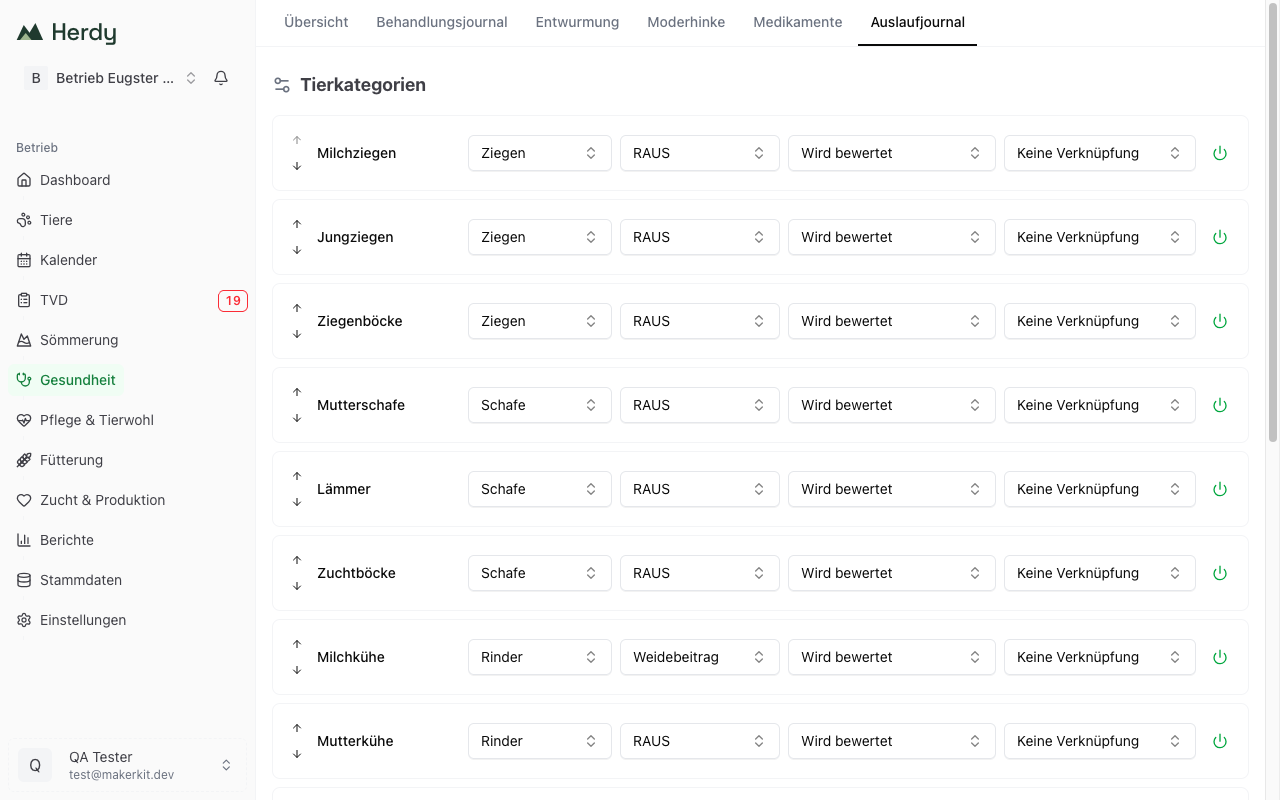
You set four things per category:
- Species: sheep, goats, cattle or pigs. It determines which rule applies.
- Programme: RAUS, pasture contribution or no programme. The pasture contribution is offered for cattle only.
- Journal requirement: Assessed (the rule), or an exemption (see below)
- Herd group (optional): links the category to a group from Master data > Groups
The arrows reorder the categories; the switch on the right deactivates a category or takes it back.
On first use Herdy creates default categories matching your herd (for example ewes, lambs, breeding rams). While no category exists, the journal shows the button Create default categories instead of the confirmation card, because without categories there is nothing to confirm.
Journal requirement and exemption
Where the housing system meets the outdoor-access rules all year round, the Direct Payments Ordinance (Annex 6 B, 1.6 and 2.2) requires no documentation at all. This affects, for example, fattening cattle, male breeding animals and female cattle under 160 days with permanent access to an exercise yard.
Two exemptions are available:
- Exempt: permanent outdoor access
- Exempt: met by housing system
An exempt category is no longer assessed, appears without a target and without a reminder. You can still record days voluntarily. The exemption outranks every programme: an exempt RAUS category stops being measured without you having to clear the programme.
What a linked group brings
- Herdy shows the current animal count next to the category name, for example «Ewes · 33 animals»
- Alpine summering days are credited to that category automatically
- For a pasture group, Herdy suggests its pasture in the pasture field
- The coverage notice can work out which animals are in no category
The link can be removed at any time (No link) and changes nothing about days already recorded. Moving a group does not rewrite the past either: an animal reassigned in autumn does not change the summer's printout.
Alpine days taken over automatically
Animals on an alpine summering season in Herdy appear automatically as alpine days, for every day of the stay. You do not have to record anything extra for the alpine period.
- Recording starts with the ascent and ends with the descent
- Alpine days count as pasture days
- You can fill gaps manually; your own entry always wins
- This requires a category linked to the group of the summered animals
Which categories receive alpine days is decided when you create the season, with the choice Only linked categories or Cover all categories. If your categories are not yet linked to groups, take the second one. Both options are explained under Create a season.
Export
Three formats are available under Export:
- Monthly journal (PDF): the grid of one month, one row per animal category, with the counter below it plus reasons, pasture and notes
- Annual journal (PDF): one sheet per animal category with all twelve months as columns
- Download CSV: date, animal category, programme, exercise type, pasture, reason and notes for further processing
The header names the farm, the TVD number and the farm type; the footer carries the counter per category.
Legend: W = pasture · L = exercise yard · A = alpine pasture · – = no exercise
No «S»: on the official form, S stands for bad weather. Herdy therefore writes bad-weather days as L with a reason and alpine days as A, so no alpine day is read as a day missed.
Extract or complete
If a filter is set, Herdy exports an extract: the filter appears in the PDF header and in the file name, and a line states explicitly that this is a partial extract. For the monthly journal, Herdy additionally offers Monthly journal — complete.
Use the complete version for an inspection. The extract is meant for your own use, for example to show a farm manager the cattle only.
Journal start
Herdy remembers the day of your first entry. Anything before it is not assessed: those months show grey with before journal start instead of red with «Not met». Whatever you kept on paper before that remains valid; Herdy simply does not know it and therefore claims nothing about it.
The month in which you start is also only partly recorded in Herdy and is therefore not yet assessed. From the first full month Herdy counts normally, and the annual overview explicitly reckons since journal start, both on screen and in the annual journal.
Retention
Keep the journal for 8 years. The note also appears on every export. Inspections are unannounced, so export the journal regularly or keep it current in Herdy.
What the journal does not cover
- Pigs, lactation period: outdoor access during lactation is not evaluated separately. Record those days through the notes.
- Pigs in individual housing: the first and last day and the number of animals also belong in the notes.
- Tethered housing: the period rules for tethered cattle and goats are not implemented yet.
- Equids and poultry: not supported.
- Individual animals: the journal keeps animal categories. Note individual ear tags, for example for a transport, in the note.
- BTS: the BTS programme requires no exercise log, so it does not appear as a programme.
Tip: confirm the day in two seconds every day rather than reconstructing it at the end of the year. That keeps the effort minimal and the record reliable.