A mating is the starting point of all breeding documentation. When a ewe, doe or cow is mated, you record it in Herdy. From it come the expected due date and the whole check schedule up to the birth.
Recording a new mating
- Go to Breeding and choose the Matings tab.
- Tap Record mating.
- Fill in the form (see below).
- Tap Record mating at the bottom.
Many animals at once? If the ram runs with the herd for a few weeks, do not record that fifty times individually, record a mating group.
The fields in detail
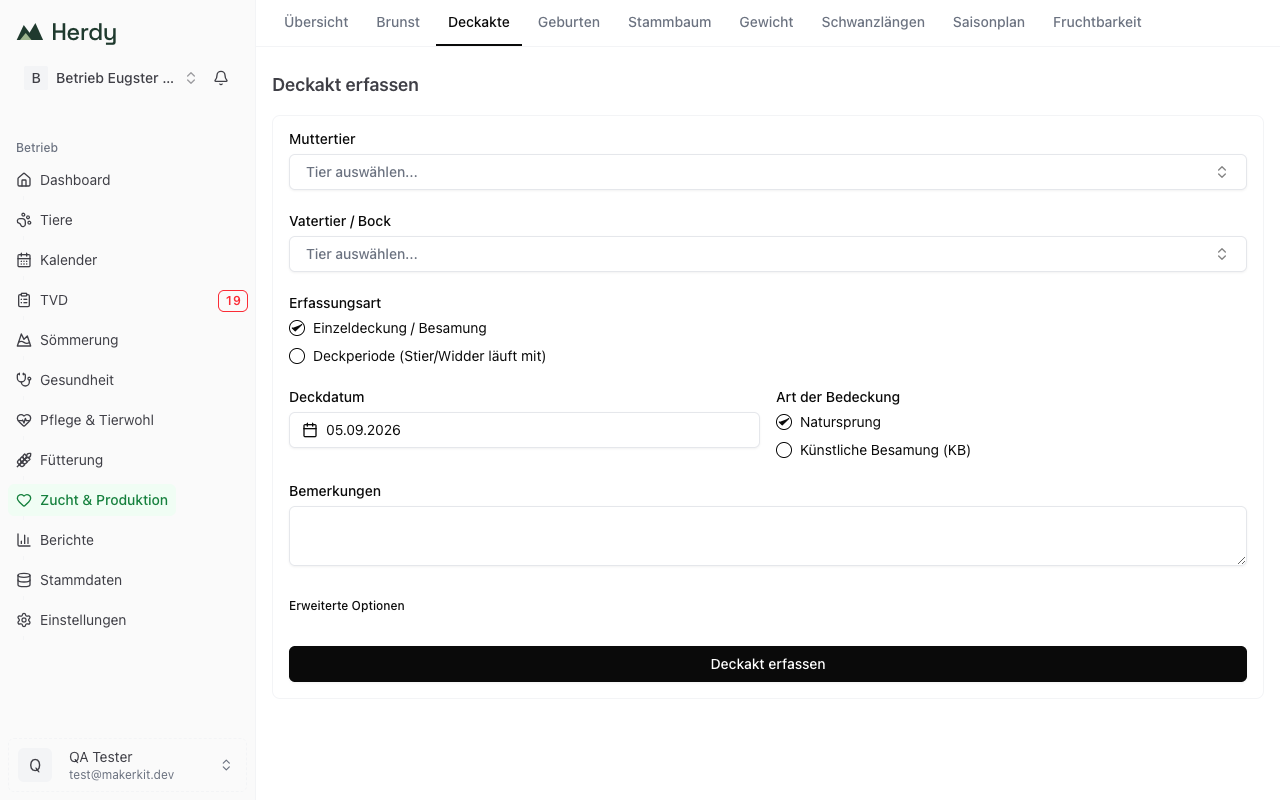
Dam (required)
Choose the female animal from your herd. The list only shows female animals.
Sire / Buck (optional, recommended)
Choose the ram, buck or bull. If the sire is not in your herd, a borrowed ram for instance, leave the field empty.
Tip: record the sire whenever possible. It is the basis for the pedigree and for the inbreeding check.
As soon as dam and sire are chosen, Herdy calculates the inbreeding check for the possible offspring. What it shows and how to read it is explained in Pedigree & ancestry.
Recording type
- Single mating / AI: there is an exact mating date.
- Mating period (bull/ram runs with the herd): for natural service without an exact date. Herdy then calculates a birth window instead of a single date, and the return-heat checks are dropped, because the male re-covers himself.
For a mating period Herdy asks for Period start and Period end instead of a single mating date.
Mating date (required)
For a single mating, the date of the service. Herdy proposes today.
Mating type
- Natural service: the sire covers naturally
- Artificial insemination (AI): by the vet or an insemination technician
Notes (optional)
Room for extra information, for example whether the service was observed.
Advanced options
Behind Advanced options sits Gestation length (days). Leave it empty and Herdy calculates with the breed value (cattle) or the species default. Your own value overrides both and must lie between 100 and 320 days. The stored values are listed under Fertility analysis.
Automatic due-date calculation
As soon as you save, Herdy calculates the expected due date. For cattle it does so per breed, because the differences run up to nine days; for sheep, goats and pigs the species value applies. A mating period produces a birth window instead of a single date.
The date appears immediately in the list and in the breeding overview.
Tip: the calculated due date is a guide. Actual gestation can differ by a few days depending on breed and animal.
The mating list
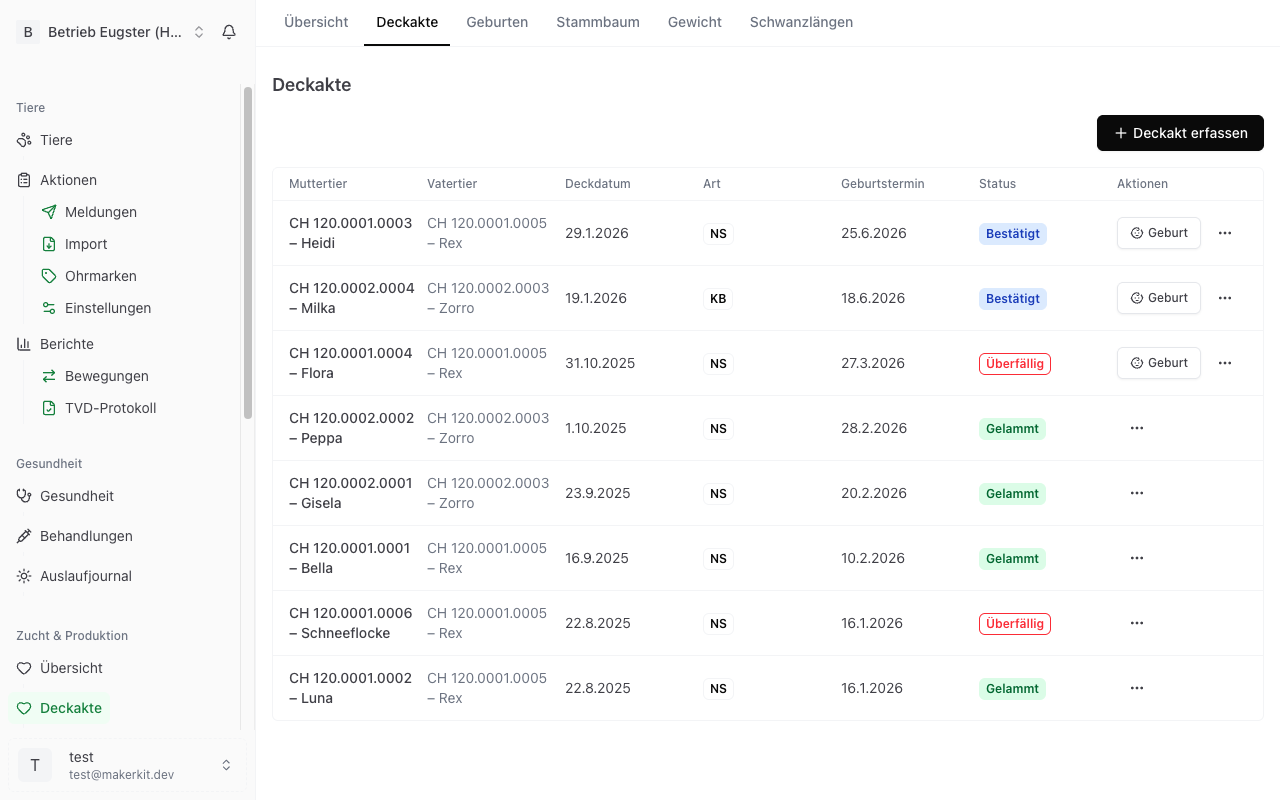
Every mating appears in the Matings tab. Three buttons sit at the top: Record preg. check (the pregnancy check for several animals), Record mating group and Record mating.
Each row shows dam, sire, mating date, type (NS for natural service, AI for artificial insemination), due date and status.
Cycle band and check schedule
Under each active mating lies a band from the mating date to the due date and, below it, the check schedule:
- Return-heat check 1 and 2 with date and note, for example "no return heat observed"
- Pregnancy check with date, or "confirmed manually"
- Due date or calving window
Green means done or passed without a heat, amber due, red overdue, grey still to come. How the dates come about is explained in Heat monitoring.
Pregnancy checks per mating
At the bottom of the row sits the Pregnancy checks block. As long as nothing is recorded, Record first check leads straight to the form with examination date, method (ultrasound, palpation, blood test, visual check, other), result, estimated day of gestation, vet and notes. A positive check confirms the pregnancy automatically.
Mating status
| Status | Meaning |
|---|---|
| Unconfirmed | Recorded, pregnancy neither confirmed nor ruled out. Set when the mating is recorded. |
| Confirmed | The pregnancy is confirmed, by a positive check or by hand. |
| Due soon / Overdue | The due date is close or has passed. |
| Lambed | A birth has been recorded for this mating. |
| Failed | The mating did not result in a pregnancy. |
| Cancelled | The mating was cancelled. |
Actions in the list
- An unconfirmed mating offers Confirm.
- A confirmed mating offers Birth, leading to the birth form with dam and sire already filled in.
The three-dot menu (⋯) on the right gives you:
- Birth: record a birth, also for unconfirmed matings
- Failed: file the mating as failed, for example after a negative result
- Delete: removes the mating for good, with a confirmation dialog
Tip: use Birth from the list. That keeps the birth linked to the mating, and you do not have to enter dam and sire again.