Search, filter & export
As your herd grows, it becomes important to find animals quickly. Herdy gives you a powerful search, flexible filters, and an export function for your animal list.
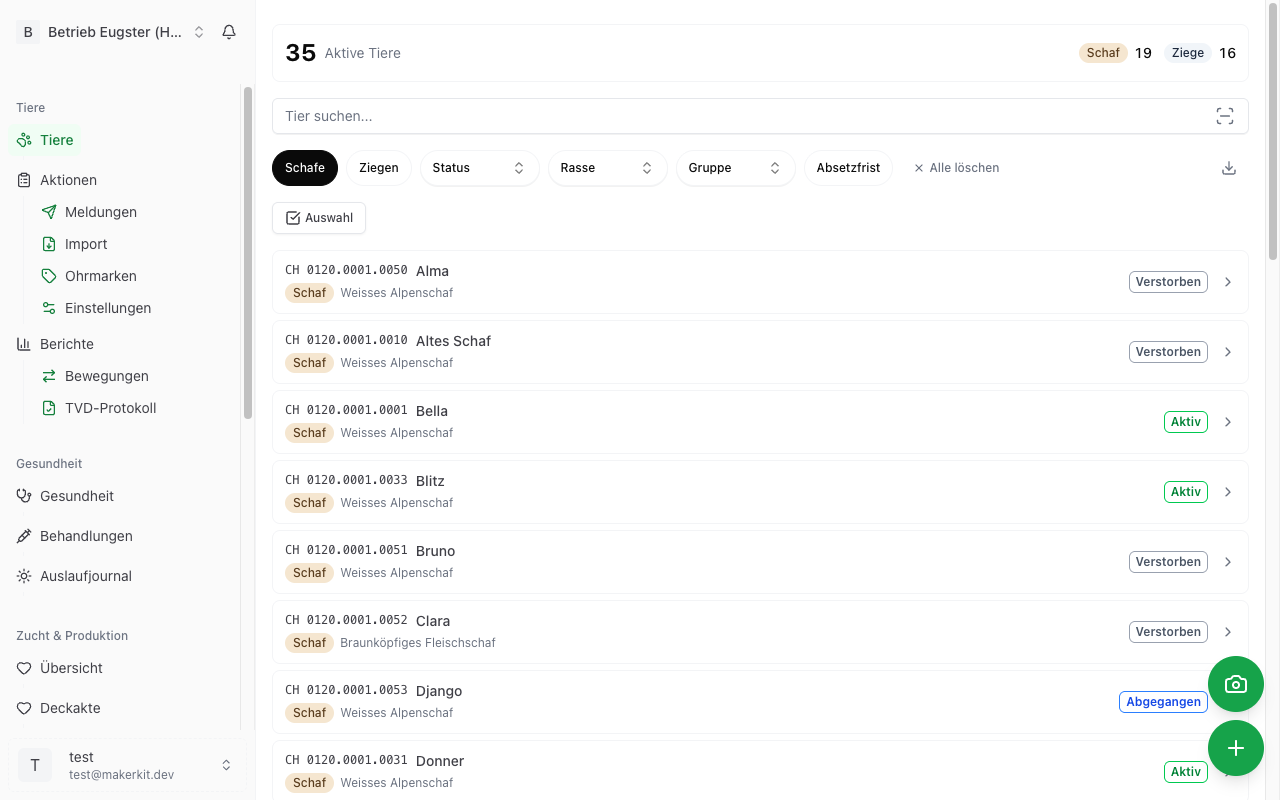
Text search
The search bar is at the top of the animal list. Simply type a search term. The search simultaneously scans all important fields:
- Ear tag (e.g. "1234" finds all animals whose ear tag contains "1234")
- Name (e.g. "Bella")
- Breed (e.g. "Alpine Sheep")
- And further fields
Results are updated instantly as you type. You do not need to press a "Search" button first.
Tip: You can also enter only part of the ear tag. Searching for "4567" finds, for example, the animal with ear tag CH 1234.4567.8901.
Filter chips
Below the search bar you find the filter chips. These are small, tappable buttons that let you narrow the animal list by specific criteria.
Available filters
Species:
- Sheep - Shows only sheep
- Goats - Shows only goats
Status:
- Active - Only active animals
- Sold - Only sold animals
- Deceased - Only deceased animals
- Slaughtered - Only slaughtered animals
- Missing - Only missing animals
Breed: The breeds displayed depend on which breeds exist in your herd. Only breeds assigned to at least one of your animals appear as a filter chip.
Group: If you have created groups and assigned animals to them, your groups also appear as filter chips. This lets you, for example, display all animals in a specific breeding group.
Withdrawal period: The Withdrawal period filter shows only animals that currently have an active withdrawal period (e.g. after treatment with medications).
Using filters
- Activate: Tap a filter chip. It is highlighted in colour.
- Deactivate: Tap the active filter chip again.
- Clear all filters: Tap Clear all (appears as soon as at least one filter is active).
Combining filters
You can use multiple filters at the same time. For example:
- Sheep + Active = All active sheep
- Goats + Withdrawal period = All goats with an active withdrawal period
- Active + a specific Breed = All active animals of that breed
Tip: The filter chips can be scrolled horizontally. Swipe to the right to see more filters. A subtle shadow on the right edge indicates that more chips are available.
Sorting
The animal list can be sorted by various criteria. By default, animals are sorted by registration date (newest first).
Export
You can download your animal list as a file at any time. This is particularly useful for accounting, the vet, or official notifications.
Export formats
- CSV - Spreadsheet format that can be opened in Excel, Google Sheets, or other programs
- PDF - Printable document with all animal data
How to export
- Tap Export (next to the search bar).
- Select Download CSV or Download PDF.
- The file is created and downloaded to your device.
The export takes into account the currently active filters. If you have filtered for only sheep, for example, the export also contains only sheep.
Tip: Export a PDF list of your animals before the alpine summering (Sömmerung). This gives you a handy overview even without internet access.