This section explains how to record a new animal in Herdy and how to edit existing entries. The form is split into sections. The mandatory fields are at the top, everything else is collected under Additional details (optional).
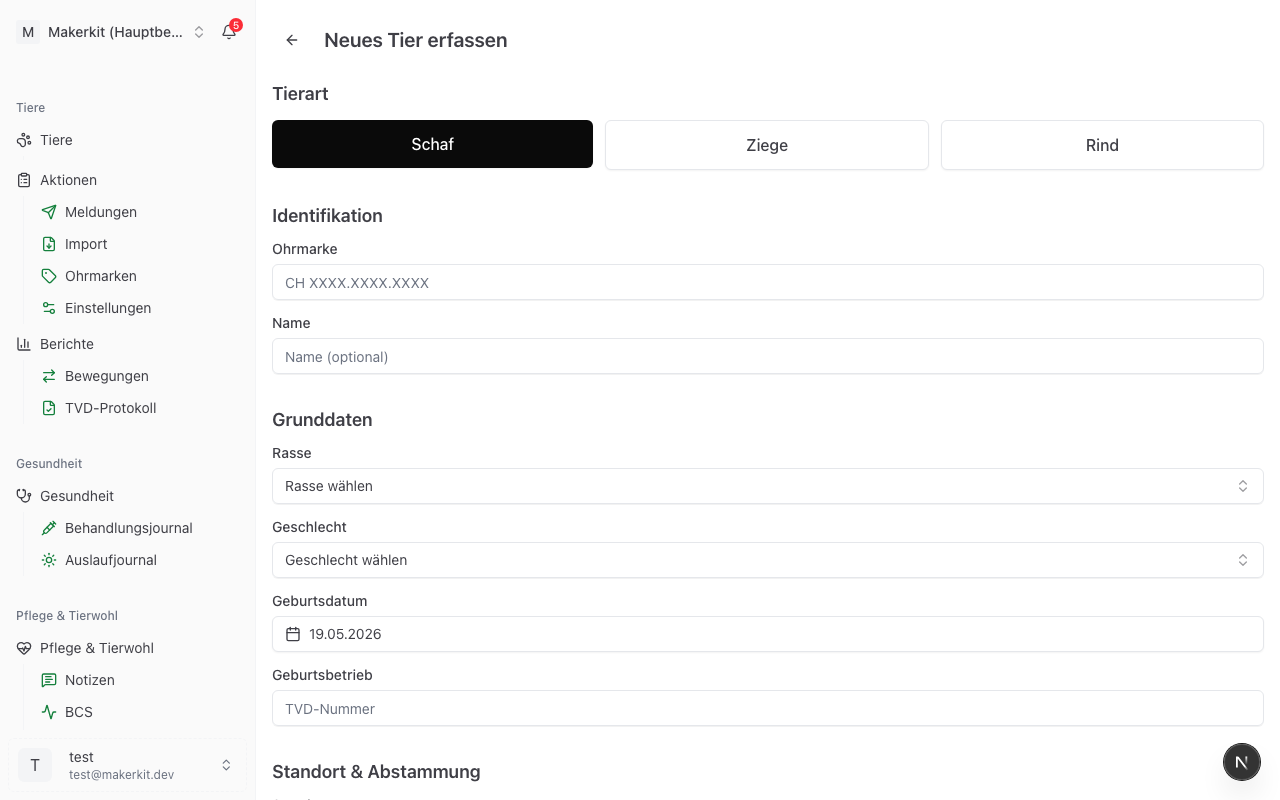
Recording a new animal
- Open animal management via Animals in the navigation.
- Tap the green button with the plus sign at the bottom right.
- Fill in the form (see below). Mandatory fields are marked with an asterisk.
- Tap Record animal at the end.
After saving you land in the animal profile, where you can add further data such as weight, BCS or treatments.
Tip: If you scanned an animal Herdy does not know, the scanner takes you straight into this form. The ear tag, the country and, when the tag is unambiguous, the species are already filled in.
Section "Species"
Choose the species first: Sheep, Goat, Cattle or Pig. The choice determines which breeds, sex labels, colour and horn options appear in the rest of the form.
Herdy initially shows only the species your farm keeps. Add another species reveals the rest, so the first animal of a new species always remains enterable.
Tip: Herdy remembers your last choice. If you last recorded a sheep, "Sheep" is preselected next time.
If the tag comes from a scan and allows several species, Herdy insists on an explicit choice. Until you tap a species yourself, the form cannot be saved. That way no animal ends up under the wrong species.
Section "Identification"
Ear tag country
The default is CH for Switzerland. For animals bought abroad, choose the country printed on the ear tag. Herdy then displays the number unchanged instead of forcing it into the Swiss grouping.
Ear tag
Enter the number as it appears on the tag. You may leave out dots and spaces, Herdy formats it for you:
| Species | Example |
|---|---|
| Sheep | CH 1234.5678 |
| Goat | CH 1234567 |
| Cattle | CH 123.4567.8901.2 |
For cattle, Herdy points out that two ear tags are required, at least one of them with an FDX-B chip. The number is entered by hand; reading the chip with a smartphone is not technically possible.
The field also accepts scans: if a Bluetooth reader is paired and the cursor sits in the ear tag field, the scan enters the number and the country directly. If the tag read contradicts the chosen species, it is rejected rather than stored under the wrong one. See Bluetooth reader.
You can also record an animal without an ear tag, for example a newborn lamb. You add the tag later in the animal profile.
Name
The name is optional. Many farms use call names because they make daily work easier. In every list the ear tag comes first and the name second.
Section "Basic data"
Breed
The list contains the official breeds of the chosen species, exactly as the livestock traffic database maintains them: around 50 sheep breeds, 20 goat breeds, more than 60 cattle breeds and the nine pig categories. Each breed carries its code before the name, for example "WAS - White Alpine Sheep", "SAA - Saanen goat", "BS - Brown Swiss" or "ES - Swiss Large White". For crossbred pigs, choose "KR - Crossbreed".
Sex
Sex is a mandatory field. The label depends on the species:
| Species | Female | Male |
|---|---|---|
| Sheep | Ewe | Ram |
| Goat | Doe | Buck |
| Cattle | Cow | Bull |
| Pig | Sow | Boar |
Castrated
Sex and castration are two separate facts. The sex stays unchanged after a castration, only the castration status changes.
As soon as you choose Male, the Castrated checkbox appears. Tick it if the animal is castrated and enter the castration date below if you know it. In lists and in the profile the animal then appears under the usual term: wether for sheep, castrated buck for goats, steer for cattle, barrow for pigs.
When taking data over from the TVD, Herdy recognises wethers, steers and castrated bucks itself and sets "male" plus "castrated".
Tip: If a castration is carried out, also record it in the treatment journal. That documents the date, the vet and any medicines with their withdrawal periods, as the regulations require.
Date of birth
Herdy suggests today's date. For purchased animals, enter the actual date of birth if known.
Birth farm
Optionally the TVD number of the farm where the animal was born. For purchased animals this is useful because it records the origin.
Section "Location & lineage"
Location
Choose the current location from the locations you have recorded. If you have set a home location, it is already preselected and marked (Home farm). See Locations.
Dam and sire
If the parents are recorded in Herdy, link them here. The picker shows animals of the same species with the matching sex. Leave the field empty when the parent is unknown or not recorded.
Herdy checks the link: an animal cannot become its own ancestor. Contradictory entries are rejected on save.
Tip: Lineage is the basis for the pedigree and for the breeding evaluations.
Section "Additional details (optional)"
This part is collapsed. Tap it to open it. You may leave it closed and add everything later in the animal profile.
Characteristics
- Colour: for sheep and cattle you choose from the official TVD colour palette. This value travels with birth notifications. Goats have no TVD colour list, so there you enter free text in the Colour/markings field, for example "White, brown patches".
- Horn status: the options depend on the species. Sheep: Horned, Polled, Scurred. Goats: Horned, Polled, Disbudded. Cattle: all four. Pigs have no horn status.
- Tail length: Normal or Docked. Ongoing measurements in centimetres are kept separately, see Tail lengths.
Condition
The BCS (body condition score) cannot be entered here. It is kept as a running history and recorded after saving, in the animal profile on the BCS tab. See BCS.
The photo function is not available yet.
Notes
Free text for everything that fits nowhere else: distinctive features, origin, agreements.
Saving
Tap Record animal. If your plan's animal capacity is used up, a notice with your options for more capacity appears instead of the confirmation. The animal is not created in that case.
Editing an existing animal
- Open the animal from the animal list.
- Tap Edit at the top right.
- Change the fields you need.
- Tap Save changes.
In the edit form all sections are open, and one field is added that the creation form does not have: the status.
Changing the status
| Status | Meaning |
|---|---|
| Active | The animal is on the farm |
| On alp | The animal is summered and still counts as part of your herd |
| Departed | The animal has left the farm, for example through a sale |
| Deceased | The animal has died |
| Slaughtered | The animal was slaughtered |
| Missing | The animal is missing |
The animal list shows Active and On alp by default. Departed, deceased and slaughtered animals stay on record and still appear in reports, but in the list they only become visible via the status filter.
Recording a death or slaughter
If you set the status to Deceased or Slaughtered, the mandatory Date of death field appears.
With the status Deceased, Herdy creates a death notification as a draft on save, provided the animal carries an ear tag and is known to the TVD, and tells you so. The notification is not sent yet: you review and send it in the TVD overview. The legal deadline is three days. If creating the draft fails, Herdy says so explicitly so you can file the notification by hand.
With the status Slaughtered, no draft is created. The slaughter notification to the TVD is always filed by the abattoir. For sheep and goats you file a departure notification with the reason «Slaughter» yourself instead; for cattle you record the slaughter intent on the animal profile. See TVD notifications.
Pigs produce no individual notification, because pigs are only reported to the TVD as stock movements.
Deleting an animal
Delete sits in the animal profile behind the three dots at the top right. Herdy refuses to delete in two cases:
- The animal has entries in the treatment journal. Treatments and vaccinations must be kept for three years.
- The animal is recorded as the dam or sire of other animals. Otherwise its offspring would lose their pedigree.
In both cases, set the animal to Departed or Deceased instead. That is the right route anyway: deleting is meant for mistyped entries, not for animals that have left the farm.