Overview
Every medical treatment of your animals must be documented under TAMV Art. 28. In Herdy you keep a single treatment journal for that. It holds four entry types, which you pick at the top of the form:
- Medication: diagnosis, product, quantity, withdrawal periods, vet
- Vaccination: vaccine, dose, batch number, scheduled booster
- Castration: method; also sets the animal's castration status
- Hoof trimming: findings and affected hooves
All entries appear chronologically in the same list and on the health tab of every animal profile.
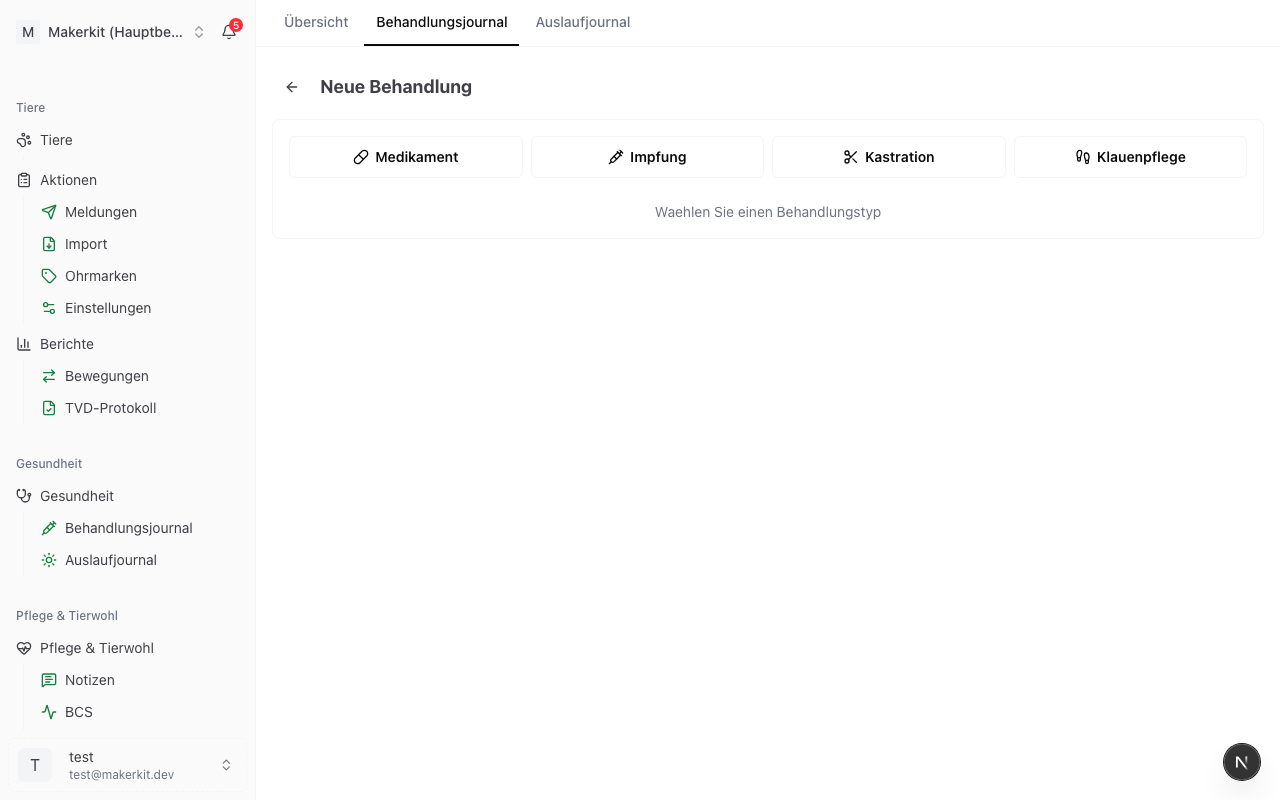
Recording a single treatment
- Go to Health > Treatment journal
- Tap New treatment
- Pick the type Medication at the top
- Fill in the fields (see below)
- Tap Record treatment
Animal identification
Search for the animal by ear tag or name. Herdy shows the ear tag first and the name second, so you read the same order in the barn as on the tag.
Treatment data
- First application: when the treatment started
- Last application: the final day of a multi-day treatment; the same date for a single dose. The withdrawal periods count from this date.
- Diagnosis / indication: the reason for the treatment, for example foot rot, parasite infestation, diarrhoea or pneumonia
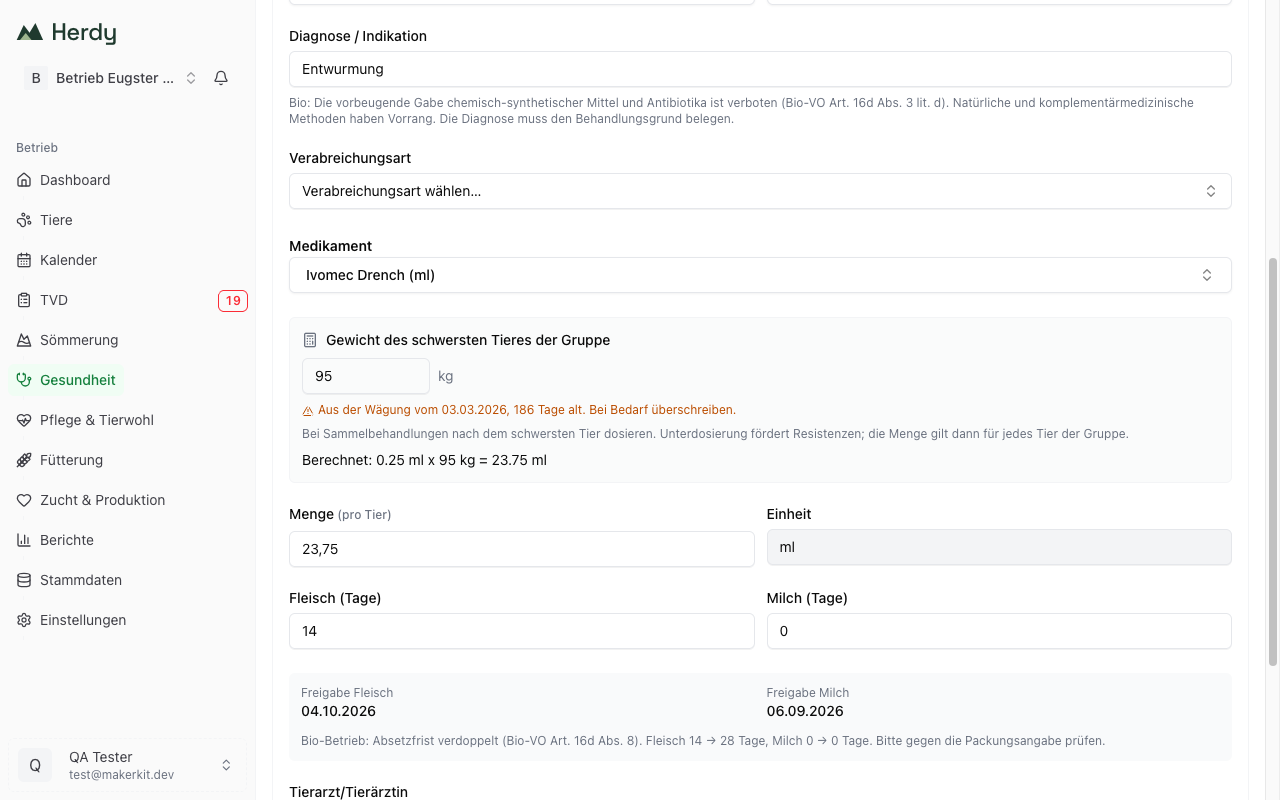
On organic farms a note appears below the diagnosis: the preventive use of chemically synthesised products and antibiotics is prohibited (Organic Ordinance Art. 16d para. 3 lit. d). The diagnosis has to justify the treatment.
Medication and quantity
Pick a product from your catalogue. The selection list shows the current stock next to each product. If a product is missing, add it through Record new medication without leaving the form.
Per-kilogram dosing. If the product carries a rate per kilogram in the catalogue (for example «1 ml per 10 kg»), Herdy shows a calculator:
- The field Live weight of the animal is pre-filled with the most recent weighing, including its date and age. If it is older than 30 days it is marked amber, because an old weight systematically underdoses a growing animal.
- Herdy works out the amount and writes it into Quantity, for example «Calculated: 0.25 ml x 65 kg = 16.25 ml».
- The quantity stays editable. What gets stored is always the amount actually administered, as the TAMV requires.
If there is no weighing, enter or estimate the weight. Without a weight Herdy does not calculate.
If the product is dosed per animal, the calculator is not shown and the default dosage appears as a suggestion in the quantity field.
Route of administration
Choose how the product was given: oral, intramuscular, intravenous, subcutaneous, intramammary, intrauterine, topical, intraruminal or other. On organic farms, Art. 16d para. 4 of the Organic Ordinance requires this in the journal. If the product carries a usual route in the catalogue, it is preselected.
Withdrawal periods and release dates
The withdrawal periods for meat, milk and organs come from the selected product and can be adjusted if your vet prescribed different periods. From the date of the last application and the periods, Herdy calculates the release dates.
On organic farms the period is doubled for chemically synthesised allopathic products. The note names both values, for example «Meat 14 → 28 days», so you can check against the packaging. See Withdrawal periods.
Notices Herdy shows
Depending on the farm and the product, additional notices appear:
- Organic treatment counter: how many counting treatments the animal has already had this calendar year. From the fourth onwards it loses its organic status (Organic Ordinance Art. 16d para. 9). For veal calves the limit is one instead of three.
- Critical antibiotics: on Bud farms, critical substance classes are not permitted for first-line treatment. If an antibiogram is available, tick the box.
Further fields
- Prescribing vet: who prescribed or carried out the treatment
- Notes: free text for dosing hints or observations
Vaccination, castration and hoof trimming
You pick these three types in the same form. They have their own fields and no withdrawal periods derived from a product. They are described in their own sections:
Group treatment
When you treat several animals at once, for example a deworming or a whole-flock vaccination, use the group treatment.
- Go to Health > Overview and tap Group treatment
- Select the animals in step 1. Select animals:
- pick an existing group through Select group, for example «Ewes»
- or pick individual animals through Select animals
- or read the ear tags with a connected reader. Scanned animals collect in the card at the top, and Continue to review adds them to the selection.
- Tap Continue with … animals
- In step 2. Treatment data, pick the type and fill in the treatment once
- Tap Record treatment for … animals
Herdy creates a separate, complete entry for every animal. Each animal keeps its own documentation even though the treatment happened together.
Dosing in a group. For a product with a rate per kilogram, Herdy asks for the weight of the heaviest animal in the group. Group treatments are dosed to the heaviest animal because underdosing drives resistance. The calculated amount then applies to every animal, which is why the field reads Quantity (per animal).
Organic limit in a group. If individual animals in the selection would reach the organic treatment limit with this treatment, Herdy names them before saving. Remove them from the selection if that is not intended.
Deworming anaemic animals straight away. Animals with FAMACHA score 4 or 5 can be dewormed directly from the FAMACHA page. As soon as such animals are recorded, the button Deworm … anaemic appears at the top with their number. It opens the group treatment with exactly those animals preselected, as a medication treatment with antiparasitics. See FAMACHA score for details.
Treatments from a recording session. Treatments you record on the go in a recording session end up in the same treatment journal. If you take an entry back there with Undo last entry, it is not deleted but voided: it stays visible through Show voided entries, and the quantity is credited back to the medication stock. See Recording Sessions for details.
Viewing and filtering the journal
The list under Treatment journal shows every entry. You can filter by:
- Type: All, Medications, Vaccinations, Castrations, Hoof trimming
- Period: This year, Last year, Last 6 months, All
- Animal: a single animal
- Vet: search by name
- Show voided entries: additionally shows voided and superseded entries
On a phone, every filter except the type sits behind the Filter button.
Correcting, voiding or repeating an entry
Tapping an entry opens a panel with three tabs: Overview, Edit and History.
Edit
In the Edit tab you correct individual fields and can give a reason. Two fields are locked:
- Date and animal can never be changed. If they are wrong, void the entry and record it again.
- The medication is locked after 24 hours.
Void
A wrong entry is not deleted, it is voided. That is what keeping a complete journal requires.
- Open the entry and tap Void... in the Edit tab
- Give a reason, at least three characters. It is mandatory and stays in the journal permanently.
- If you want to record the entry correctly straight away, choose Replace with corrected entry. Herdy opens the form with the values pre-filled.
- Confirm with Void
Voided and superseded entries disappear from the list but stay visible through Show voided entries, and they never appear in the export.
History
The History tab shows every change: who changed what and when, with the old and new value. Edited entries carry a small marker in the list that leads straight into the history.
Repeat
Repeat opens the form with all the data of the existing entry and today's date. That saves time on recurring treatments.
Export: the official treatment journal
The export produces the BLV official form «Treatment journal», one set of sheets per species, treatments and vaccinations together, with every mandatory column of TAMV Art. 28. The official form is recognised for TAMV, QS Milch, QM-Schweizer Fleisch, IP-SUISSE, TerraSuisse, Coop Naturafarm, Mutterkuh Schweiz and Agri Natura.
How to export
- Go to Health > Treatment journal and tap Export
- Choose the period (this year, last year, last 6 months, all, or your own date range) and optionally a group
- Tap Official form as PDF, or Journal as CSV for further processing in a spreadsheet
Herdy shows beforehand how many entries fall into the period and how they split between treatments and vaccinations.
The header block with the year, TVD number, name and address of the farm and the sheet count appears on every page. Voided and superseded entries are left out. Castrations and hoof trimming have their own lists under Other exports, because they do not belong in the treatment journal.
Requirement: the farm address has to be filled in under settings, it feeds the header block «Name and address of the farm». Retain the document for 3 years.
About the group filter: it filters by today's group membership, not by the membership at the time of treatment.
Organic journal
On organic farms the export is called Organic journal as PDF and additionally carries the columns Antibiotics, Critical antibiotics and Antibiogram, plus the doubled withdrawal periods. If a product used in the period has no antibiotic classification, Herdy names it before the export so you can add it in the master data.
Tip: export your treatment journal as a PDF regularly and file it. Inspections are unannounced, so you are ready at any time.